 Translate



I cannot make a search in my whole TM. Studio only makes searches in the segments created in 2020. Anyone to help me please?
I have reviewed the options and other settings but cannot resolve the problem.

I cannot make a search in my whole TM. Studio only makes searches in the segments created in 2020. Anyone to help me please?
I have reviewed the options and other settings but cannot resolve the problem.
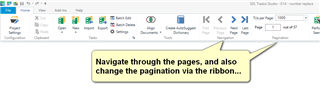
Is this just a paging problem?
Perhaps you can elaborate a little as the question is not completely clear. What do you mean by created in 2020? Have you set filters?
Paul Filkin | RWS
Design your own training!
You've done the courses and still need to go a little further, or still not clear?
Tell us what you need in our Community Solutions Hub


Unfortunately no...
In fact, for example, when searching one couple of words I know I have already translated, it appears no results. Or if I have chance, it displays the results found in segments dated 2020... It is just like if Studio 2021 had removed the segments created before 2020

I think the most likely problem here is that you are not checking the TM you are actually working on. Please check that you are not working on a project TM, or that you have a TM in a different location. You can hover over the TMs to make sure they are the same ones in the same place.
Paul Filkin | RWS
Design your own training!
You've done the courses and still need to go a little further, or still not clear?
Tell us what you need in our Community Solutions Hub
Thank you Paul for this answer. Unfortunately again this is not the problem. When I open the actual TM used yesterday with Studio 2021, it appears that it only contains 72 pages. But if I open this TM (stored and not updated since 02/2020), it contains 922 pages. All the work done before has disappeared...
When I open the actual TM used yesterday with Studio 2021, it appears that it only contains 72 pages. But if I open this TM (stored and not updated since 02/2020), it contains 922 pages.
I'm afraid you seem to be confirming exactly what I have said. You are not checking the same TM. I'm fairly certain there is no problem here because this is such a fundamental feature I'm pretty sure we'd have the forums overwhelmed with reports of problems.
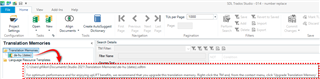
For example, if I look at this TM and hover over it in my TM Maintenance View I can see it's here:
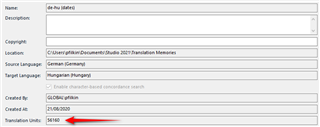
This TM contains 56160 TUs:
If I create a project with this very same TM and use the "Prepare" batch task I will see this:

I have used the same TM but the one I'll be updating now will be this one:

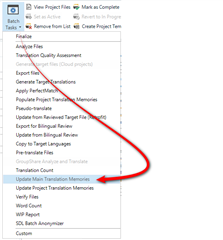
And this one will contain very few TUs. At the same time my main TM won't get updated with the work I'm doing at all, at least not until run a batch task to update my main TMs:
If you know all of this already then apologies... and perhaps you can show me why the explanation you have given so far is evidence of your larger TM not containing the new translations?
Or perhaps the problem is simply more basic than this. Just hover over the TMs in your project and the one you are checking in your TM Maintenance View (as I did) and see what the paths are? If they are different, and if you have not created your projects as I just explained, then you also have the answer to your question.
Paul Filkin | RWS
Design your own training!
You've done the courses and still need to go a little further, or still not clear?
Tell us what you need in our Community Solutions Hub

I thought and hoped you were right... but I have checked both TMs and they are the same. Anyway thank you very much for your help. I will try to solve the problem, even if I really don't understand 
Perhaps we could take a look at this with you tomorrow over a remote connection. I think that would be the best way to get to the bottom of this. If you'd like to do this please drop an email to pfilkin@sdl.com
Paul Filkin | RWS
Design your own training!
You've done the courses and still need to go a little further, or still not clear?
Tell us what you need in our Community Solutions Hub
Thank you Paul for this proposal. I have "discovered" that when using Google Drive, you can download previous versions of your documents. As my TMs are on Google Drive (as I work on two PC...), I am downloading the previous TMs and will try to use them again in Studio 2021. If the problem occurs again, I think I will accept your remote help 
Thank you again for your answers and your help!!! I will tell you if it is ok now.
Just a few words of warning when you work this way. This is one way to corrupt your TMs because they are not designed to be used with concurrent transactions being performed. For example, if you have a large TM and a slow connection then Google drive will be backing up the entire TM, not just the transaction you just made, every time you confirm a segment. So the likelihood of you working faster than the TMs getting backed up is high. It won't always be a problem, but it's a risk.
Probably better to us Trados Live to keep your work in sync and run a seperate operation to keep your local TMs in sync so you avoid these problems. By separate I mean back up when you are not using them, and not while you use them.
Paul Filkin | RWS
Design your own training!
You've done the courses and still need to go a little further, or still not clear?
Tell us what you need in our Community Solutions Hub
I did not realize that :(
I will do as you say to avoid any problem. Thanks a lot!