 Translate


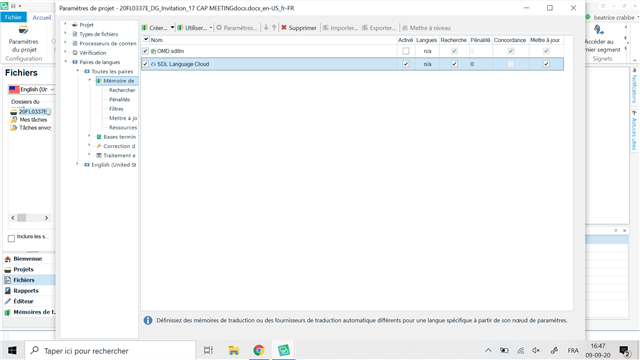
Generated Image Alt-Text
[edited by: Trados AI at 11:01 PM (GMT 0) on 28 Feb 2024]



Hello beatrice crabbe ,
Do you get any error messages at all?
Do the TM languages correspond with the project languages?
Instead of translating as single file- are you able to select the option Create New project?
The more information you can provide, the better.
Oana Nagy | QA Engineer | RWS Group

No, no message whatsoever and I have been using those TM for years on similar translations so, yes, the TM languages match. I have tried "create new project", but the problem remains. The TM get unticked when I switch from "parameters" to the document

Hello beatrice crabbe ,
I don't think I have seen such behaviour before.
Is this happening with all your TM's or just this one?
If the problem only occurs with the one TM, I would suggest trying a repair
https://appstore.sdl.com/language/app/sdltm-repair/298/
And perhaps resetting Studio
https://gateway.rws.com/csm?id=kb_article_view&sysparm_article=KB0039395
Oana Nagy | QA Engineer | RWS Group
Hello,
I am getting the same problem since I upgraded to Studio 2019. I hoped the upgrade to 2021 would solve the problem but it did not change anything :( All The TMs I use always deselect when I start translating, whether they are online or a local file.
Anytime I click on a TM to activate it, I get this error message:
<?xml version="1.0"?>
-<SDLErrorDetails time="06/10/2020 18:50:00">
<ErrorMessage>La référence d'objet n'est pas définie à une instance d'un objet.</ErrorMessage>
-<Exception>
<Type>System.NullReferenceException, mscorlib, Version=4.0.0.0, Culture=neutral, PublicKeyToken=b77a5c561934e089</Type>
<HelpLink/>
<Source>Sdl.TranslationStudio.Common</Source>
<HResult>-2147467261</HResult>
-<StackTrace>
-<![CDATA[ à Sdl.TranslationStudio.Common.TranslationMemory.TranslationMemoriesControlUtils.AbstractUiStrategy.CanDeleteCascadeEntryItem(ProjectCascadeEntryItem cascadeEntryItem)
à Sdl.TranslationStudio.Common.TranslationMemory.TranslationMemoriesControlUtils.DefaultUiStrategy.UpdateButtons()
à Sdl.TranslationStudio.Common.TranslationMemory.TranslationMemoriesControl.UpdateUi()
à Sdl.TranslationStudio.Common.TranslationMemory.TranslationMemoriesControl.RefreshUiStrategy()
à Sdl.TranslationStudio.Common.TranslationMemory.TranslationMemoriesControl.IsSelectedCellChanged(CellEventArgs e)
à Sdl.TranslationStudio.Common.TranslationMemory.TranslationMemoriesControl._selectTranslationMemoryGrid_CellChange(Object sender, CellEventArgs e)
à Infragistics.Win.UltraWinGrid.UltraGrid.OnCellChange(CellEventArgs e)
à Infragistics.Win.UltraWinGrid.UltraGrid.FireEvent(GridEventIds id, EventArgs e)
à Infragistics.Win.UltraWinGrid.UltraGridCell.CellChangeHelper(Object sender, EventArgs ev)
à Infragistics.Win.EmbeddableEditorBase.RaiseValueChangedEvent()
à Infragistics.Win.ToggleEditorBase.SetEditorValueInternal(Object newVal)
à Infragistics.Win.ToggleEditorBase.SetNextState()
à Infragistics.Win.CheckEditorCheckBoxUIElement.OnCheckStateChange()
à Infragistics.Win.CheckBoxUIElement.OnClick()
à Infragistics.Win.ControlUIElementBase.ProcessMouseUpHelper(Object sender, MouseEventArgs e)
à Infragistics.Win.ControlUIElementBase.ProcessMouseUp(Object sender, MouseEventArgs e)
à Infragistics.Win.Utilities.ProcessEvent(Control control, ProcessEvent eventToProcess, EventArgs e)
à Infragistics.Win.UltraControlBase.OnMouseUp(MouseEventArgs e)
à System.Windows.Forms.Control.WmMouseUp(Message& m, MouseButtons button, Int32 clicks)
à System.Windows.Forms.Control.WndProc(Message& m)
à System.Windows.Forms.Control.ControlNativeWindow.OnMessage(Message& m)
à System.Windows.Forms.Control.ControlNativeWindow.WndProc(Message& m)
à System.Windows.Forms.NativeWindow.Callback(IntPtr hWnd, Int32 msg, IntPtr wparam, IntPtr lparam)]]>
</StackTrace>
</Exception>
-<Environment>
<ProductName>SDL Trados Studio</ProductName>
<ProductVersion>Studio16</ProductVersion>
<EntryAssemblyFileVersion>16.0.1.2917</EntryAssemblyFileVersion>
<OperatingSystem>Microsoft Windows 10 Professionnel</OperatingSystem>
<ServicePack>NULL</ServicePack>
<OperatingSystemLanguage>1036</OperatingSystemLanguage>
<CodePage>1252</CodePage>
<LoggedOnUser>Prodesk-HP\Prodesk</LoggedOnUser>
<DotNetFrameWork>4.0.30319.42000</DotNetFrameWork>
<ComputerName>PRODESK-HP</ComputerName>
<ConnectedToNetwork>True</ConnectedToNetwork>
<PhysicalMemory>16703660 MB</PhysicalMemory>
</Environment>
</SDLErrorDetails>
I tried the TMrepair Plugin and resetting Studio, and even uninstalling it, but nothing works unfortunately.
Thanks,
Céline Capoulade
Hello,
I am getting the same problem since I upgraded to Studio 2019. I hoped the upgrade to 2021 would solve the problem but it did not change anything :( All The TMs I use always deselect when I start translating, whether they are online or a local file.
Anytime I click on a TM to activate it, I get this error message:
<?xml version="1.0"?>
-<SDLErrorDetails time="06/10/2020 18:50:00">
<ErrorMessage>La référence d'objet n'est pas définie à une instance d'un objet.</ErrorMessage>
-<Exception>
<Type>System.NullReferenceException, mscorlib, Version=4.0.0.0, Culture=neutral, PublicKeyToken=b77a5c561934e089</Type>
<HelpLink/>
<Source>Sdl.TranslationStudio.Common</Source>
<HResult>-2147467261</HResult>
-<StackTrace>
-<![CDATA[ à Sdl.TranslationStudio.Common.TranslationMemory.TranslationMemoriesControlUtils.AbstractUiStrategy.CanDeleteCascadeEntryItem(ProjectCascadeEntryItem cascadeEntryItem)
à Sdl.TranslationStudio.Common.TranslationMemory.TranslationMemoriesControlUtils.DefaultUiStrategy.UpdateButtons()
à Sdl.TranslationStudio.Common.TranslationMemory.TranslationMemoriesControl.UpdateUi()
à Sdl.TranslationStudio.Common.TranslationMemory.TranslationMemoriesControl.RefreshUiStrategy()
à Sdl.TranslationStudio.Common.TranslationMemory.TranslationMemoriesControl.IsSelectedCellChanged(CellEventArgs e)
à Sdl.TranslationStudio.Common.TranslationMemory.TranslationMemoriesControl._selectTranslationMemoryGrid_CellChange(Object sender, CellEventArgs e)
à Infragistics.Win.UltraWinGrid.UltraGrid.OnCellChange(CellEventArgs e)
à Infragistics.Win.UltraWinGrid.UltraGrid.FireEvent(GridEventIds id, EventArgs e)
à Infragistics.Win.UltraWinGrid.UltraGridCell.CellChangeHelper(Object sender, EventArgs ev)
à Infragistics.Win.EmbeddableEditorBase.RaiseValueChangedEvent()
à Infragistics.Win.ToggleEditorBase.SetEditorValueInternal(Object newVal)
à Infragistics.Win.ToggleEditorBase.SetNextState()
à Infragistics.Win.CheckEditorCheckBoxUIElement.OnCheckStateChange()
à Infragistics.Win.CheckBoxUIElement.OnClick()
à Infragistics.Win.ControlUIElementBase.ProcessMouseUpHelper(Object sender, MouseEventArgs e)
à Infragistics.Win.ControlUIElementBase.ProcessMouseUp(Object sender, MouseEventArgs e)
à Infragistics.Win.Utilities.ProcessEvent(Control control, ProcessEvent eventToProcess, EventArgs e)
à Infragistics.Win.UltraControlBase.OnMouseUp(MouseEventArgs e)
à System.Windows.Forms.Control.WmMouseUp(Message& m, MouseButtons button, Int32 clicks)
à System.Windows.Forms.Control.WndProc(Message& m)
à System.Windows.Forms.Control.ControlNativeWindow.OnMessage(Message& m)
à System.Windows.Forms.Control.ControlNativeWindow.WndProc(Message& m)
à System.Windows.Forms.NativeWindow.Callback(IntPtr hWnd, Int32 msg, IntPtr wparam, IntPtr lparam)]]>
</StackTrace>
</Exception>
-<Environment>
<ProductName>SDL Trados Studio</ProductName>
<ProductVersion>Studio16</ProductVersion>
<EntryAssemblyFileVersion>16.0.1.2917</EntryAssemblyFileVersion>
<OperatingSystem>Microsoft Windows 10 Professionnel</OperatingSystem>
<ServicePack>NULL</ServicePack>
<OperatingSystemLanguage>1036</OperatingSystemLanguage>
<CodePage>1252</CodePage>
<LoggedOnUser>Prodesk-HP\Prodesk</LoggedOnUser>
<DotNetFrameWork>4.0.30319.42000</DotNetFrameWork>
<ComputerName>PRODESK-HP</ComputerName>
<ConnectedToNetwork>True</ConnectedToNetwork>
<PhysicalMemory>16703660 MB</PhysicalMemory>
</Environment>
</SDLErrorDetails>
I tried the TMrepair Plugin and resetting Studio, and even uninstalling it, but nothing works unfortunately.
Thanks,
Céline Capoulade

Can you try deleting this file and restart Studio:
c:\Users\[USERNAME]\AppData\Local\SDL\SDL Trados Studio\Studio16\TranslationMemoryRepository.xml
Also, given this is all your Translation Memories can you advise where yor Translation Memories are stored? Can you provide the full path to one as an example?
Paul Filkin | RWS
Design your own training!
You've done the courses and still need to go a little further, or still not clear?
Tell us what you need in our Community Solutions Hub
Thanks Paul,
I deleted the file you mentioned and the problem is still the same.
Here is a typical path to a TM: C:\Users\Prodesk\Documents\SDL\Projets\2020\10\07
But the problem also applies to TMs online on GroupShare.
Please can you create a new thread so I can convert this to a case for you. I can't do this if you tag onto the back of another one.
Paul Filkin | RWS
Design your own training!
You've done the courses and still need to go a little further, or still not clear?
Tell us what you need in our Community Solutions Hub
I just created it, thanks for your help Paul :)