
 Translate



Hello,
Today when opening a project for review which has quite a lot reps with numbers I noticed something very strange.
First of all, my studio version is 14.1.10018.54792 and my auto-propagation settings are the following ones:
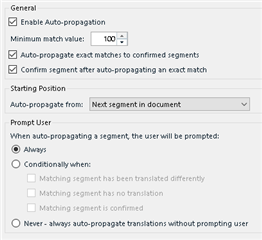
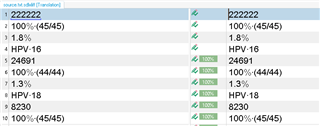
When I open the file for translation, the TM has no segments at all, so I copied source to target and pressed Ctrl+Enter to auto-propagate the reps. Process went good, nothing extra-ordinary. See the result below:
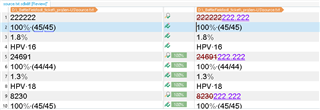
Then, I opened the file for review and changed the translation of segment nr.1 to "222.222". When I pressed Ctrl+Enter I noticed that segments 5 and 9 changed too; but the translation now doesn't match source at all. See below:
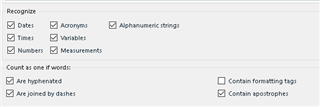
The TM recognition settings are:
Have you seen that before? What do I have to change in my settings so as to prevent this from happening?
Sample project attached for your investigation.
/cfs-file/__key/communityserver-discussions-components-files/90/nlg_5F00_2_5F00_sdl_5F00_ticket.zip
Thanks,
Pavlos
Generated Image Alt-Text
[edited by: Trados AI at 10:41 PM (GMT 0) on 28 Feb 2024]


