The Trados cloud platform will be undergoing maintenance on Saturday, 9th May 2026 between 05:00 to 17:00 UTC. During this time, you will not be able to log in to the Trados platform.

embedded content in Excel

Hi,

I have the following type of strings in an Excel sheet

<p>Confectionn&eacute; dans une mousseline 100% coton douce, souple et l&eacute;g&egrave;re, le lange en tetra assure le confort tout au long de l&rsquo;ann&eacute;e et en toute saison.<br />Lavage apr&egrave;s lavage, elle gagne en douceur et en souplesse.</p>

Although embedded content and convert entities are activated, it does not seem to be recongnized as tags and entities...

Screenshot of Trados Studio showing a warning message indicating that HTML tags and entities are not recognized in an Excel sheet string.

What should I do ? it's getting urgent....


Generated Image Alt-Text
[edited by: Trados AI at 10:40 PM (GMT 0) on 28 Feb 2024]
emoji
Parents
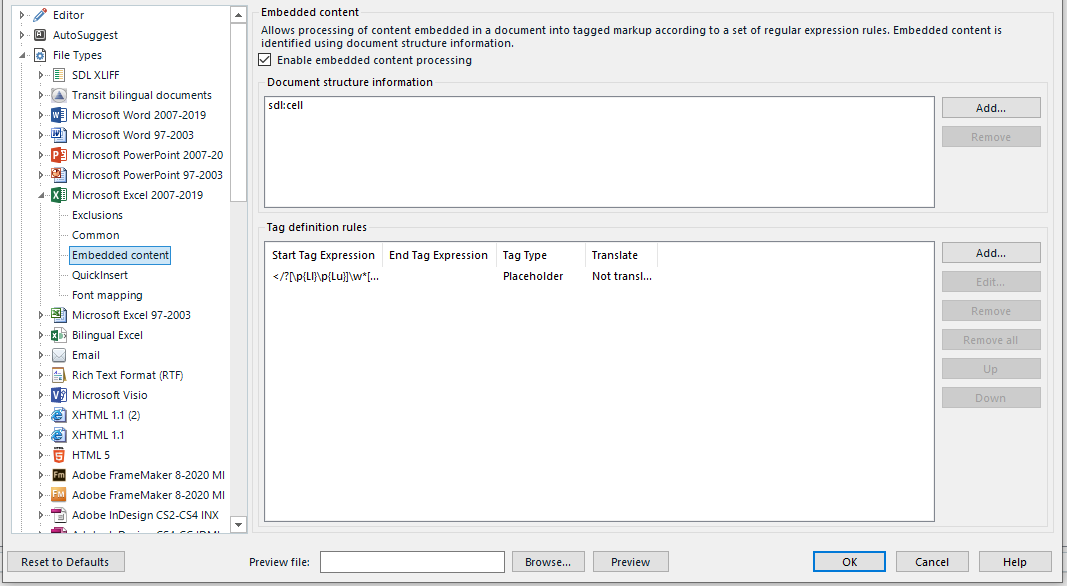
  • Tags should be recognized, if you activate embedded content this way:

    Trados Studio screenshot showing the Embedded content settings with a tag definition rule for a placeholder added to protect entities in Excel.

    This must be activated in the corresponding project template BEFORE importing the Excel file. Doing this afterwards will change nothing.

    Entities will not be recognized in Excel. You can protect these as tags, adding &[^;]*?; as tag definition rule for a placeholder.

    Your text is html, so ask your customer to provide it in different format than Excel.

    _________________________________________________________

    When asking for help here, please be as accurate as possible. Please always remember to give the exact version of product used and all possible error messages received. The better you describe your problem, the better help you will get.

    Want to learn more about Trados Studio? Visit the Community Hub. Have a good idea to make Trados Studio better? Publish it here.

    emoji


    Generated Image Alt-Text
    [edited by: Trados AI at 10:40 PM (GMT 0) on 28 Feb 2024]
Reply
  • Tags should be recognized, if you activate embedded content this way:

    Trados Studio screenshot showing the Embedded content settings with a tag definition rule for a placeholder added to protect entities in Excel.

    This must be activated in the corresponding project template BEFORE importing the Excel file. Doing this afterwards will change nothing.

    Entities will not be recognized in Excel. You can protect these as tags, adding &[^;]*?; as tag definition rule for a placeholder.

    Your text is html, so ask your customer to provide it in different format than Excel.

    _________________________________________________________

    When asking for help here, please be as accurate as possible. Please always remember to give the exact version of product used and all possible error messages received. The better you describe your problem, the better help you will get.

    Want to learn more about Trados Studio? Visit the Community Hub. Have a good idea to make Trados Studio better? Publish it here.

    emoji


    Generated Image Alt-Text
    [edited by: Trados AI at 10:40 PM (GMT 0) on 28 Feb 2024]
Children