The Trados cloud platform will be undergoing maintenance on Saturday, 9th May 2026 between 05:00 to 17:00 UTC. During this time, you will not be able to log in to the Trados platform.

"Add New Translation" and "Concordance Search" Functions Deactivated

Hi Everyone. 

I am very inexperienced at using SDL and I have a question:

I was sent a package with 4 documents by a client. All documents are very similar. And there should be a lot of CM/100% matches. I have completed the 1st document, but I then noticed that when I started on the 2nd the software was not recognizing any of the matches. It was then I noticed that the “add as new translation” and “concordance search” features are deactivated (appear as grey). I ran a repair and it still did not work. Does anyone have an idea why? Is it sometime with the file sent by the client? I would appreciate any help.

Thanks so much

Stephen

Parents Reply
  • Hi Stephen, 

    No need. You can create your own TM, populate it with what you have translated so far and then use it for future translations.

    Try this:

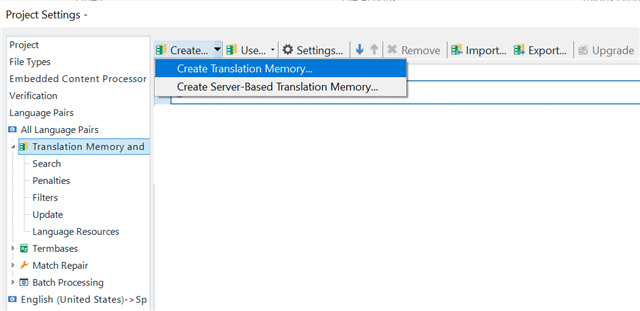
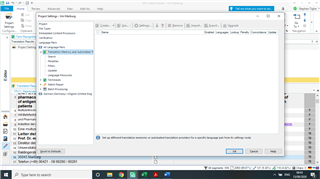
    1. Open your translated file, go to Project Settings - All Language Pairs - Translation Memory and Automated Translation and create a translation memory, making sure that you store the file in a path that is easy for you to find later.

    Trados Studio Project Settings window showing the option to create a new translation memory under Translation Memory and Automated Translation.

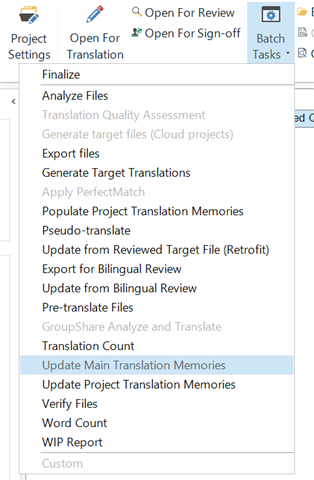
    2. Go to the Home tab, then Batch Tasks  and select the one called Update Main Translation Memories. This will save all your translated segments to your newly created translation memory.

    Trados Studio Home tab displaying Batch Tasks menu with the option Update Main Translation Memories highlighted.

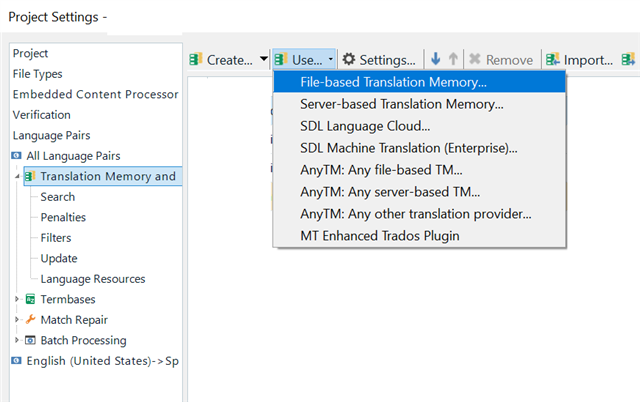
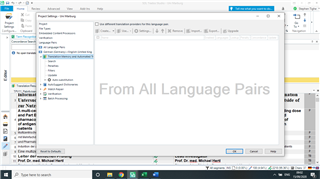
    3. After this, when translating new documents, make sure to add your translation memory under Project Settings - All Language Pairs - Translation Memory and Automated Translation - Use.

    Trados Studio Project Settings with Translation Memory and Automated Translation expanded, showing options for using different types of translation memories.

    As long as you have added your translation memory to your project and the Update checkbox is checked, every new segment that you translate and confirm will be added to the translation memory and will be available to you for matching future segments. 

    emoji


    Generated Image Alt-Text
    [edited by: Trados AI at 10:42 PM (GMT 0) on 28 Feb 2024]
Children