Studio 2017 does NOT work.

Hi all,

I have watched several tutorials where translation happens magically but no matter the amount of videos or articles I have had to put into my brain, nothing works as they show.

The programme kind of asks me to choose from online dictionaries, re-directing me to Opera! Aren't YOU supposed to do this?Translation memories seem to play an important role but when you habe none, what do you do? And am I supposed to download some other MT content from the net for it to work??!

It just WON'T translate.

I wrote about the issue to one of your in-house advisers and all I received in reply was "Welcome to our Community, please set your profile so others can know you". Pardon? I have a huge document to process and the company only wants it on SDL Trados. Unless I can get it sorted by tomorrow, I will have lost a £££ot  of work.

I have spent 2 days trying all possibilities, looking everywhere for those options that are written in small font (despite they are important!) , fetching test-documents from my Word to practice on. At the best, it leads to my own original text segmented but NOT translated. Only the "pseudo translation works" and this is pure joke. Try that if you want a laugh. This very expensive programme is a vast circus all in a loop.

So once I have selected my files, clicked next and next and next, done my languages pair, clicked Finish and Report and God knows what else, which button is the one for TRANSLATE? Why don't you have a simple TRANSLATE button since you claim to be doing Machine Translation?

Parents
  • Although I never used Studio 2017, only 2019 and now 2021, your version of the program worked fine for 4 years in hundreds of thousands of use cases, so take hope, if you learn how to use it it will work for you as well.

    Studio is not a machine translation application, it's a CAT tool. Yes, you can integrate machine translation if you have a subscription with an MT provider (or maybe there are free ones as well).

    If you got to the point where you were able to have files pseudo-translated (not a joke, very useful to estimate space requirements of target text), you could have pre-translated them with MT as well.

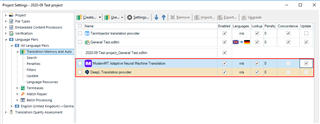
    In order for that to work, you need to set up an MT provider under Project Settings -> Language Pairs, All language pairs-Translation Memories and Automatic Translation.

    Trados Studio Project Settings window showing installed machine translation providers with SDL Machine Translation highlighted in red.

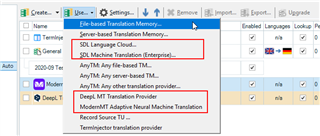
    You can add MT providers or TMs using the "Use..." menu item or add new TMs using the "Create..." menu item. I marked installed MT providers in red. If you want to use MT providers other than SDL's you might have to install an plug in from SDL's appstore. (The plug-ins are free, the service they connect to usually costs, it's other companies like DeepL, Google Translate, Microsoft Translator etc.)

    Dropdown menu in Trados Studio with options for adding translation memories and machine translation providers, with 'SDL Machine Translation' option highlighted.

    You did not tell us which MT provider you were trying to employ? 

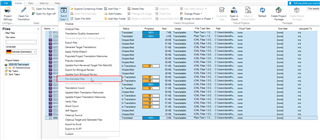
    Assuming that you actually have an MT provider, you mark the files or the project which you want to pre-translate, select pre-translte from batch tasks...

    Trados Studio batch tasks menu with 'Pre-translate Files' option selected and 'Apply automated translation' setting highlighted.

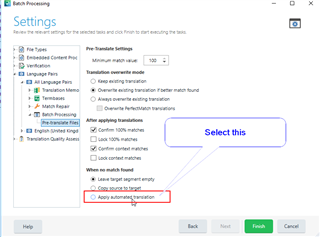
    Click yourself through some "Next"s until you arrive at these settings, where you select "Apply automated translation":

    Settings window in Trados Studio with 'Apply automated translation' option selected and a note to 'Select this' for automated translation.

    This will use the first activated MT provider that you set in your Project settings.

    I think (not sure with Studio 2017) that you have to install a plug-in to use SDL's language cloud NMT engine, but I think (again, not sure) that you have 500000 free characters of machine translation.

    All the best. It's rather daring to accept a huge translation on a tight deadline using a new tool, if I may say so, but I really wish you all the best.

    Daniel

    emoji


    Generated Image Alt-Text
    [edited by: Trados AI at 10:56 PM (GMT 0) on 28 Feb 2024]
  • Hi Daniel and thank you so much for your precious advice. I have now managed to add Google MT via the API key and this is working fine. I will be interested in purchasing the latest version as soon as it's available.

    Kindest regards,

    Magali

Reply Children