Translate



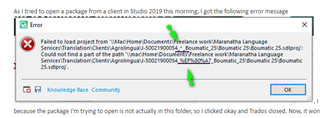
As I tried to open a package from a client in Studio 2019 this morning, I got the following error message  . I thought ut was strange because the package I'm trying to open is not actually in this folder, so I clicked okay and Trados closed. Now, it won't open at all. It just keeps presenting the same silly error message. Can anyone help at all?
Thanks in advance.
Karin
Generated Image Alt-Text
[edited by: Trados AI at 10:45 PM (GMT 0) on 28 Feb 2024]