Lost project due to power cut

Maybe you can help me with a new problem. This morning due to a power failure I have lost an important Trados project I was working on with no problem. It has disappeared from the list of projects. When I tried to open it with "Open Project" option I got this message: "An error occurred whilst trying to determine the file version". Is there any solution for this error? Many thanks for your help.

Parents Reply
  • HI 

    It is so very frustrating when I've done a whole lot of work, maybe got so engrossed that I haven't saved then the software crashes!

    So, I have found that turning off any 'extra' functionality that I don't use prevents this from happening.

    For example, when I'm don't need Fragment Matching/Match Repair, I turn it off...

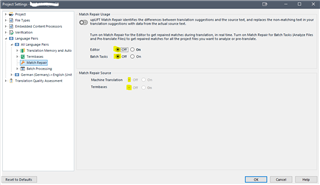
    So, here in Project settings I turn this off:

    Trados Studio Project Settings window with Match Repair option turned off under the Match RepairFragment Match Repair section.

    Or... if you don't work with projects, i.e. 'Translate Single File', turn off the same settings under File>Options

    (Individual project settings always overrule the same settings made under File>Options)

    I also close the Fragment Matches window in Editor. Most of my work as a proofreader is done in Review mode so I don't need Fragment matches...

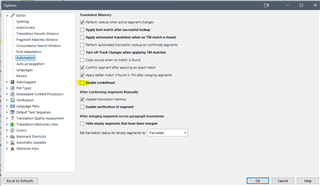
    However, if you don't want to turn off Match Repair or Fragment matching, try turning off LookAhead via File>Options, here:

    Trados Studio Options window showing LookAhead feature turned off under the Automation section.

    What I'm saying basically is... turning off anything you don't need/use makes the software more streamlined, efficient and stable.

    If the above doesn't help, it could be that the instability is caused by Studio not being installed in your current environment to the optimum, in which case, take a look at the options here:

    Repairing your installation

    I hope this helps, though it isn't the solution to your whole problem, unfortunately.

    All the best

    Ali Slight smile

    emoji


    Generated Image Alt-Text
    [edited by: Trados AI at 10:57 PM (GMT 0) on 28 Feb 2024]
Children