 Translate



How can I change the default Target Languages in my new Trados 2021. The ones shown by default do not match my language pairs.

RWS Community
How can I change the default Target Languages in my new Trados 2021. The ones shown by default do not match my language pairs.
The only place to change ONE language pair, which is suggested when you use single file approach, is here:
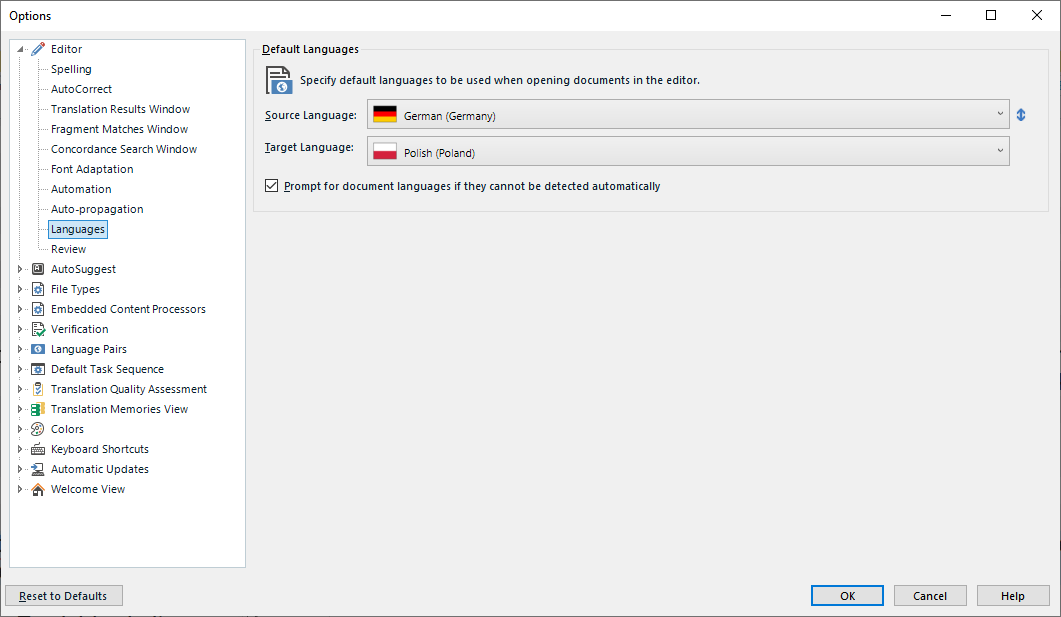
_________________________________________________________
When asking for help here, please be as accurate as possible. Please always remember to give the exact version of product used and all possible error messages received. The better you describe your problem, the better help you will get.
Want to learn more about Trados Studio? Visit the Community Hub. Have a good idea to make Trados Studio better? Publish it here.


Thank you, Jerzy; I take note of your kind reply, and also note that the Language Pairs can be introduced further down your list under that title.
I don't know if that will change the default language pairs that were installed when I installed Trados 2021. Any thoughts on that aspect, please?

I don't know if that will change the default language pairs that were installed when I installed Trados 2021.
As I just said... there are no restrictions with 2021. The whole idea of only selecting 5 languages ended with this release. You have them all!
Paul Filkin | RWS
Design your own training!
You've done the courses and still need to go a little further, or still not clear?
Tell us what you need in our Community Solutions Hub
OK, thank you very much for your comments. I do understand that all languages are available for use, but I was bothered by the three default languages that don't fit my requirements. However, I will see how the real-time application of the new program works out and will ask for help if any real problems occur. Thank you again for your very kind assistance and comments.

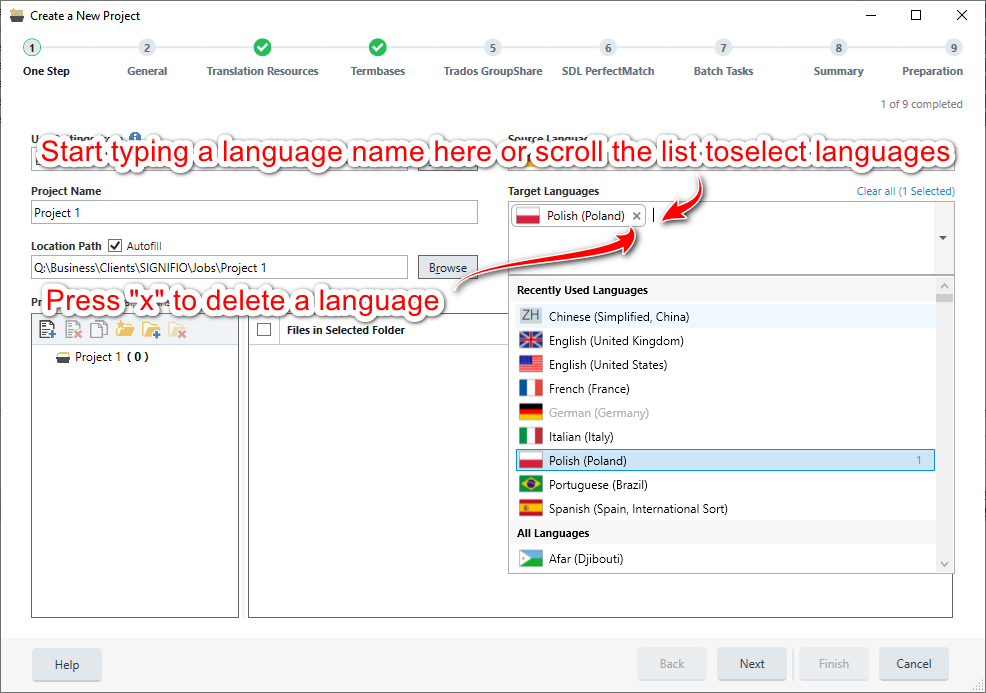
Just create a new project based on a default template and select languages here:
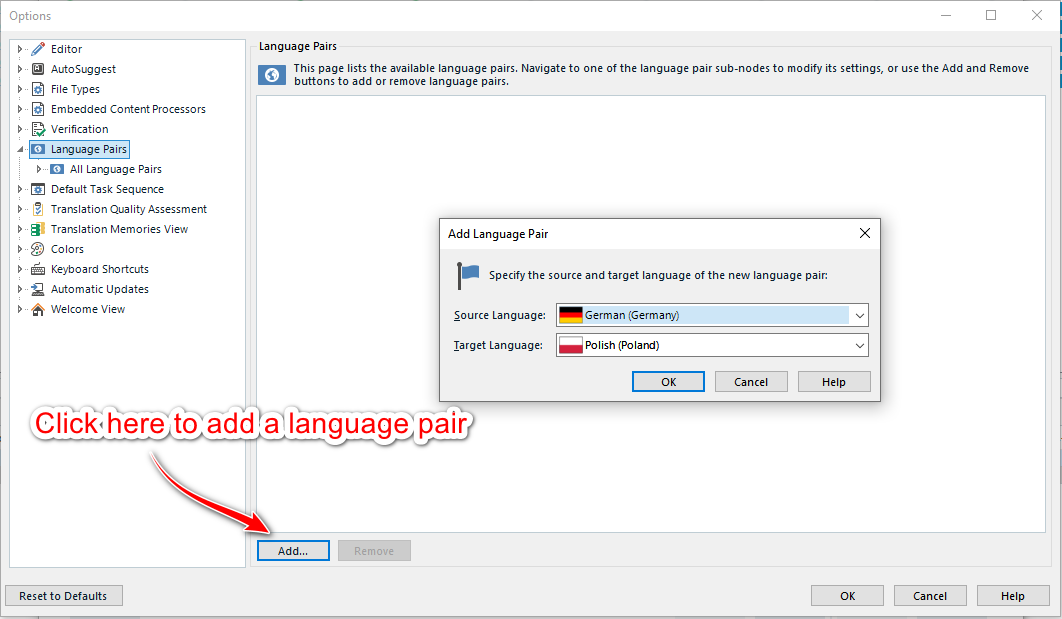
Or go to File -> Options:
However, I would NOT use the latest method, project based work is better and more clear.
_________________________________________________________
When asking for help here, please be as accurate as possible. Please always remember to give the exact version of product used and all possible error messages received. The better you describe your problem, the better help you will get.
Want to learn more about Trados Studio? Visit the Community Hub. Have a good idea to make Trados Studio better? Publish it here.
Just create a new project based on a default template and select languages here:
Or go to File -> Options:
However, I would NOT use the latest method, project based work is better and more clear.
_________________________________________________________
When asking for help here, please be as accurate as possible. Please always remember to give the exact version of product used and all possible error messages received. The better you describe your problem, the better help you will get.
Want to learn more about Trados Studio? Visit the Community Hub. Have a good idea to make Trados Studio better? Publish it here.
Many thanks, Jerzy. This sounds like an appropriate solution. However, it is strange that the default installation installs English as the Source language and presents several Target languages that are not of my choosing. I am sure this will all work out as we advance in the use of the new SDL 2021. Again, many thanks for your kind attention and assistance.
However, it is strange that the default installation installs English as the Source language and presents several Target languages that are not of my choosing.
It does not do this. There is no such thing as default languages getting installed. All that happened, I believe, is that you said yes to including the sample projects and this of course comes with whatever languages are in the sample projects (EN, DE, FR, JP). So all you are seeing are the languages you have used in Studio (as a result of including the sample projects).
Paul Filkin | RWS
Design your own training!
You've done the courses and still need to go a little further, or still not clear?
Tell us what you need in our Community Solutions Hub
Thank you very much, Paul. That makes sense and I will advance on the basis of your comments and those of Jerzy. Your kind assistance and attention are much appreciated.