Studio 2021 not recognizing dates in certain formats

Hello,

Not sure what I'm doing wrong with the auto-substitution settings or TM settings, but I keep getting this:

Screenshot showing a date format error in Trados Studio with incorrect date format yyyy-MM-dd instead of specified dd.mm.yyyy.

how does this date recognition work exactly? Is it the fault of the project translation memory not being optimized for specific formats? I added my own translation memory that has been optimized and specified all formats possible with the new Studio 2021 options, but I still keep getting this:

Screenshot displaying a date format mismatch in Trados Studio where the expected format dd.mm.yyyy is replaced by yyyy-MM-dd.

(don't mind the accuracy, it's the format Im getting with match repair: yyyy-MM-dd, even though I specified dd.mm.yyyy.

Could anyone explain?


Generated Image Alt-Text
[edited by: Trados AI at 3:08 AM (GMT 0) on 29 Feb 2024]

emoji
Parents
  • I used English to Polish to try and repro and using a default TM I get this:

    The first segment is exactly what you see.  The reason for this is that that date format is not recognised in English at all so the date is seen as two numbers:

    11.02
    14

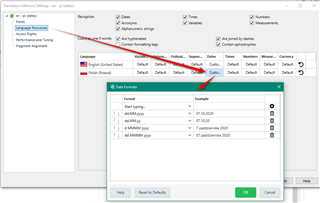
    It's then correctly localised as two numbers.  So to tell Studio this is actually a date you need to add this pattern to the language resources like this:

    Now we get this... so a bit closer:

    You want dd.mm.yyyy.  So, I now delete the date formats in Polish I don't want because there isn't a way to map a specific source to a specific target (as far as I know...  ).  I don't know what the least number of dates I'd need to delete to get the match so I simply removed all the dates starting with a year so I now have this:

    The result is this:

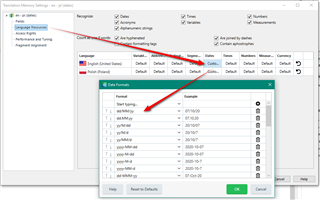
    So, the first one is correct but the second isn't... although it's at least mm.dd.yyyy so we're getting closer.  If I look in the English again I don't have the dd/mm/yy format.  So I add this and I also remove all the dates that also have a slash in them:

    Now I have this:

    Based on my interpretation of your question this seems to do the trick.

    it's the format Im getting with match repair: yyyy-MM-dd, even though I specified dd.mm.yyyy

    So I assumed that you anted dd.mm.yyyy and that the source formats were dd.mm.yy and dd/mm/yy.  Either way I hope this helps you achieve what you want?

    I need to understand this a bit better as I don't know what the minimum changes would be to achieve this and I just followed my nose. I'll document the process better when I'm a little more clear myself.

    Paul Filkin | RWS

    Design your own training!
    You've done the courses and still need to go a little further, or still not clear? 
    Tell us what you need in our Community Solutions Hub

  • Hello Paul

    This date customization feature would be a great update – if only I could make it work. So:

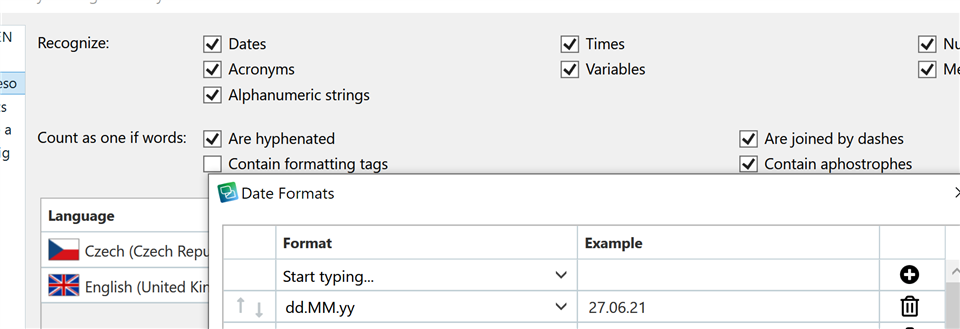
    1. I added a custom date format for English source, dd.MM.yyyy

    Trados Studio screenshot showing the 'Recognize' settings with 'Dates' checked and a custom date format 'dd.MM.yy' added for English language.

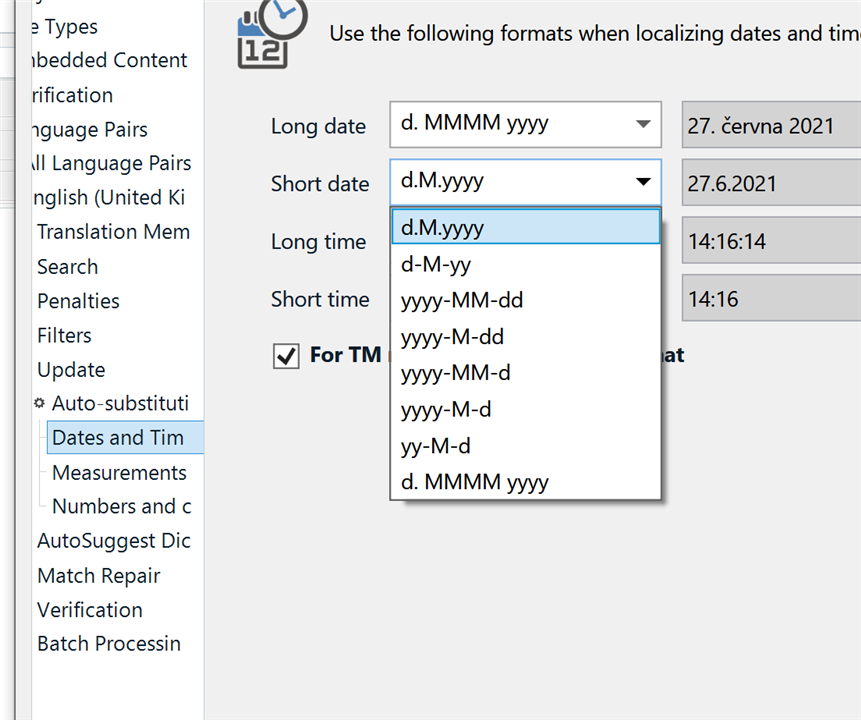
    2. Apparently it should now appear in Auto-substitution ( point no 5 here https://docs.sdl.com/813470/875590/trados-studio-2021-sr1/customizing-date-and-time-formats ), but it doesn’t

    Trados Studio screenshot of 'Auto-substitution' settings for 'Dates and Time' with the custom date format 'd.M.yyyy' highlighted but not appearing in the list.

    3. At any rate, the newly added format is not recognized in editor, even after re-indexing the TM and deleting the document and adding it again

    Trados Studio editor screenshot where the custom date format '27.07.08' is not recognized, highlighted in blue.

    I must be doing something wrong?

    Thanks, Pavel

    emoji


    Generated Image Alt-Text
    [edited by: Trados AI at 3:09 AM (GMT 0) on 29 Feb 2024]
Reply Children