You have set up different translation memories or automated translation providers for certan language pairs.

I hpe tis is posted in thr right forum!
I have just upgraded from Studio 2017 to 2021. In the process I have copied my 2017 TMs into the 2021 TM folder and upgraded them. I have also started new projects for working in 2021. I was suprised by this message but although it has been discussed on the forum before (https://community.sdl.com/product-groups/translationproductivity/f/studio/20545/german-error-message-you-have-chosen-selected-different-translation-memories-or-mt-systems-for-some-language-pairs) I could not find any answer telling me how to solve the issue. I understand the message is not critical to the 2021 funtioning properly, but I would like to find a solution. It seems to be that I need to change a setting in File - Options, but which setting? Just FYI, I work with the German version of Sudio 2021. In case it's relevant, under File-Options-Language Pairs (Sprachpaare) I only find German - English (which is fine by me!).

Thanks!

Andrew

Parents
  • When you work as freelance and use EITHER the possibility to add TMs within the "All Language Pairs" part of the project creation wizard OR within the specific language pair there, you do not need to bother with this message. Please remember, that adding TMs in both location renders the complete project unworkable. Therefore, add the TMs either in this or in that other location, but NEVER in both.

    You do not need to change anything within FIle -> Options, this will be done by Studio. But only if you work with single file approach. When you do this, you will find all the language pairs used with the single file approach within File -> Options. In case you really want to work that way (I would never recommend that, working with project templates is a much better way), you can modify the settings for each language pair listed under File -> Options that way, that the TMs for the very specific language pair are added there in the position "Specific language pair" (for example "English-German -> Translation memory and ...") instead of adding them under "All language pairs". This way, when you select the language pair at the start of a single file translation approach, only the TMs for the corresponding language pair will appear.

    _________________________________________________________

    When asking for help here, please be as accurate as possible. Please always remember to give the exact version of product used and all possible error messages received. The better you describe your problem, the better help you will get.

    Want to learn more about Trados Studio? Visit the Community Hub. Have a good idea to make Trados Studio better? Publish it here.

  • Thanks, Jerzy - and my apologies for not being able to spell such simple words as "the" in my intro! So I am a freelancer and have projects for each customer. if I have understood correctly, I should only be adding TMs in the specific German-English level and not under All language pairs? Does that mean if I remove any TMs in All language pairs in the project settings, this should solve the issue? I imagine I should also not use 2017 project templates for the 2021 projects?

    Andrew

  • In each project, I had included one TM under All language pairs. I just tried deleting the TM, checking on the TMs in the German-English setting, and clicking OK. But oddly even with no TM now und All language pairs, I still get the same message when I open Project Settings, All language pairs, Translation memories.

  • Not quite. You can safely keep the TMs in "All language pairs", for our usage it does not matter. It start matter, when you have multilingual projects, where it is simply a crawled view and hard to configure, if you put all the necessary TMs under All language pairs.

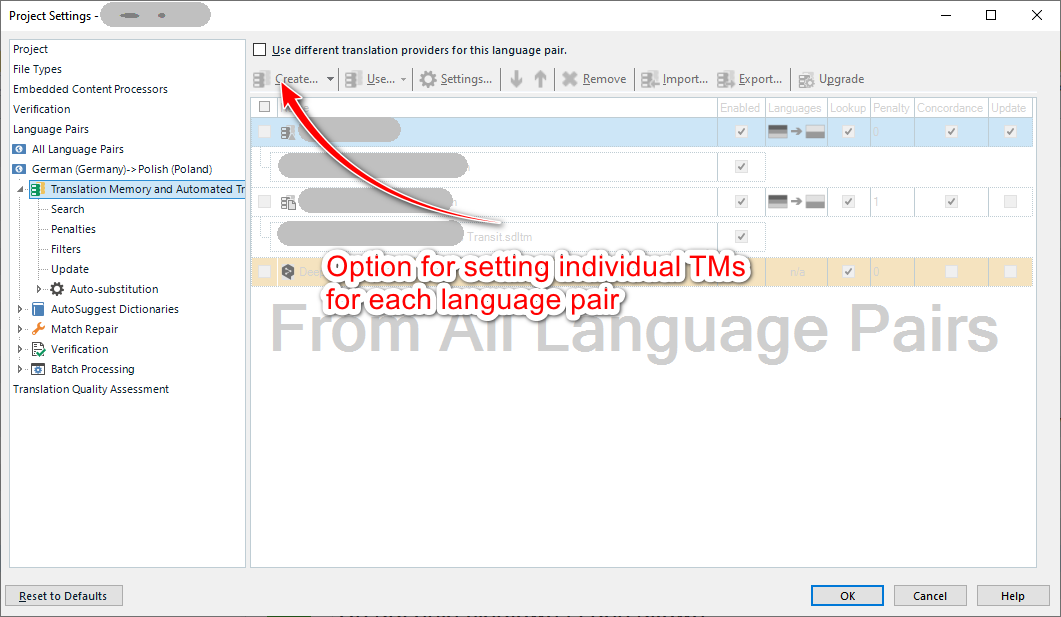
    The message you're getting is no error, just a warning. However, please check, if you do not have activated this in your language pair:

    Trados Studio screenshot showing the Project Settings window with an option highlighted for setting individual Translation Memories (TMs) for each language pair.

    If your settings look like mine, all is OK.

    However, please note, that ALL project related changes MUST be done within the project settings and NEVER via File -> Options.

    _________________________________________________________

    When asking for help here, please be as accurate as possible. Please always remember to give the exact version of product used and all possible error messages received. The better you describe your problem, the better help you will get.

    Want to learn more about Trados Studio? Visit the Community Hub. Have a good idea to make Trados Studio better? Publish it here.

    emoji


    Generated Image Alt-Text
    [edited by: Trados AI at 10:57 PM (GMT 0) on 28 Feb 2024]
Reply
  • Not quite. You can safely keep the TMs in "All language pairs", for our usage it does not matter. It start matter, when you have multilingual projects, where it is simply a crawled view and hard to configure, if you put all the necessary TMs under All language pairs.

    The message you're getting is no error, just a warning. However, please check, if you do not have activated this in your language pair:

    Trados Studio screenshot showing the Project Settings window with an option highlighted for setting individual Translation Memories (TMs) for each language pair.

    If your settings look like mine, all is OK.

    However, please note, that ALL project related changes MUST be done within the project settings and NEVER via File -> Options.

    _________________________________________________________

    When asking for help here, please be as accurate as possible. Please always remember to give the exact version of product used and all possible error messages received. The better you describe your problem, the better help you will get.

    Want to learn more about Trados Studio? Visit the Community Hub. Have a good idea to make Trados Studio better? Publish it here.

    emoji


    Generated Image Alt-Text
    [edited by: Trados AI at 10:57 PM (GMT 0) on 28 Feb 2024]
Children