Autosuggest doesn't work

Hi,

I just finished a translation from English into Macedonian, and the autosuggest worked fine. Now I have a document in the other direction. I added a few terms using Ctrl+F2, they appeared in the viewer, but when I come to a segment that has the term it just doesn't give me the option to insert the translation (and there is no line over the term in the original). What could be the problem? I'm using Studio 2021 and this is my second project, so sorry for the noob question.

Thanks!


Parents
  • What happens if you click on a few segments further down the document and then go back to the one you were originally in?  Or even if you close the file and open it again?  It sounds as though you may be falling foul of the Lookahead feature.  If you use this, and it's on by default, then Studio caches the results in advance for a few segments to speed up performance.  But a negative side-effect of this is that when you add a new term that happens to be in the next couple of segments it will not be shown because Studio cached the results at a time when it wasn't available.

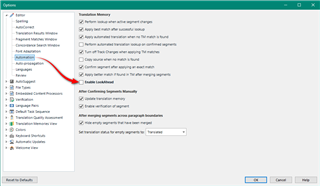
    You can disable lookahead here and also test that to see if it helps:

    Trados Studio options menu with Lookahead feature highlighted and a red arrow pointing to the checkbox to disable it.

    Paul Filkin | RWS

    Design your own training!
    You've done the courses and still need to go a little further, or still not clear? 
    Tell us what you need in our Community Solutions Hub

    emoji


    Generated Image Alt-Text
    [edited by: Trados AI at 11:01 PM (GMT 0) on 28 Feb 2024]
Reply
  • What happens if you click on a few segments further down the document and then go back to the one you were originally in?  Or even if you close the file and open it again?  It sounds as though you may be falling foul of the Lookahead feature.  If you use this, and it's on by default, then Studio caches the results in advance for a few segments to speed up performance.  But a negative side-effect of this is that when you add a new term that happens to be in the next couple of segments it will not be shown because Studio cached the results at a time when it wasn't available.

    You can disable lookahead here and also test that to see if it helps:

    Trados Studio options menu with Lookahead feature highlighted and a red arrow pointing to the checkbox to disable it.

    Paul Filkin | RWS

    Design your own training!
    You've done the courses and still need to go a little further, or still not clear? 
    Tell us what you need in our Community Solutions Hub

    emoji


    Generated Image Alt-Text
    [edited by: Trados AI at 11:01 PM (GMT 0) on 28 Feb 2024]
Children