Translate



Hi everybody,
I had earlier a "Échec de l'enregistrement du contenu cible : La valeur ne peut pas être null. Nom du paramètre :" error message when I tried to rebuild a translated 32,000 words document.
Speaking of frustration would be under what I actually felt.
Since my spouse, also a translator, had the same issue a couple of weeks ago, I conclude it's a bug in Studio 2021 (and maybe in previous versions). Or, rather, a bad design, as I explain below.
Some context first: I had to clean my Temp folder, since my C:\Drive did not have any room left. And it seems that it erased a eynzjin0.zkx.doc file stored there, that Studio needed to rebuild my translated document.
It's where I speak of bad design. If I can understand a software stores temporary files in a Temp folder when it's running, I cannot understand how Studio can leave so critical a file in a Temp folder when it is not running any longer! Any file in such folder is very vulnerable, since a Temp folder is subject to regular maintenance clean-ups. At least, necessary files to rebuild a translated document should be stored in the Project folder, or, if they need to be put in a Temp Folder when Studio is running, they should be moved back to the Project folder when one leaves it.
Anyway, I found a workaround to my issue, and I want to share it here, in case it may be useful for others.
So let's resume. After my cleaning (and I took the opportunity to move my temp folders to another larger drive), I started Studio, opened my working document, asked to build my final translated document... and I got the above message. Nothing to do.
A common solution could be have been to add a renamed copy of the document in the project, then applying the TM to it, and going on working on it. But I did not think it would be satisfying, since it meant I would have had matching problems and, more, I would have lost my numerous comments...
At a moment (I cannot remember exactly when, but you should get it too if it happens to you), I got the following dialog:
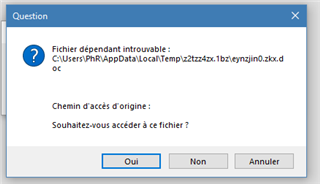
As I told, since I had cleaned my Temp Folder, that file did not exist any longer. I decided to try to recreate it.
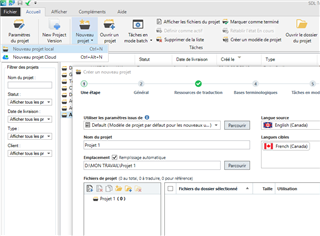
What I did is adding a renamed copy of my working document into my project, then preparing it, anticipating it would create a like temp document in the Temp folder. The idea was not to work on the renamed copy, but just to create such a temp file for the doc I just prepared.
And it worked. I got a abcdefgh.zkx.doc (I do not remember the actual name), that I renamed as eynzjin0.zkx.doc, that is the deleted temp file name. I guessed the content of the new temp file, even with a different name, would be the same. And it was.
Back to Studio, I reopened the initial working document (the renamed copy is no longer needed). When I asked to rebuild it (Shift+F12), I got as expected the above dialog again. I clicked on Yes, then pointed the new temp file (that actually was in a subfolder of my Temp folder).
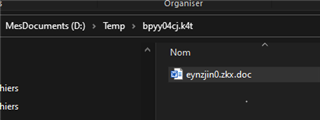
And it worked. I was able to rebuild my translated document.
HTH
Philippe
Generated Image Alt-Text
[edited by: Trados AI at 11:04 PM (GMT 0) on 28 Feb 2024]