Adding alternative translation Units to the TM

There always used to be a very helpful command in the Editor for adding alternative TUs to the TM (keyboard shortcut CTRL + Shift + U). This was very helpful when a certain original sentence was known to have different meanings and thus different translations in the target language. Using it, the system would add two alternatives with a match rate of 99% each to the TM instead of a 100% or context match. That's often crucial for our daily work as we can influence how this particular unit will be translated next time it Comes up instead of being a 100% match which we will most likely overlook in the next Translation project. We only check 100% and context matches once, i.e. the first time they come up as a new TU - we cannot look through them every time.

 I've just spent some desparate time Looking for it - please don't tell me it's gone!

Thanks for filling me in!


Parents
  • Hi

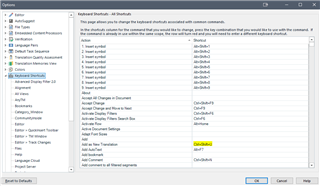
    It is still there in Studio 2021 so as far as I know it has never been removed. It is accessible via File>Options>Keybouard Shortcuts as here:

    Trados Studio 2021 Options window showing Keyboard Shortcuts tab with a list of actions and their associated shortcut keys.

    It still works, took I've just checked.

    Maybe you are looking for it under Project Settings? It isn't available via the project settings. 

    An important point you may not know... Any settings that are made in the Project Settings will overrule the same settings made under File>Options, i.e. the settings for your profile.

    However, there are a lot of settings accessible via File>Options that aren't in the project settings and they will apply to any project or single document you work on.

    I hope this helps,

    All the best,

    Ali Slight smile

    emoji


    Generated Image Alt-Text
    [edited by: Trados AI at 11:01 PM (GMT 0) on 28 Feb 2024]
Reply
  • Hi

    It is still there in Studio 2021 so as far as I know it has never been removed. It is accessible via File>Options>Keybouard Shortcuts as here:

    Trados Studio 2021 Options window showing Keyboard Shortcuts tab with a list of actions and their associated shortcut keys.

    It still works, took I've just checked.

    Maybe you are looking for it under Project Settings? It isn't available via the project settings. 

    An important point you may not know... Any settings that are made in the Project Settings will overrule the same settings made under File>Options, i.e. the settings for your profile.

    However, there are a lot of settings accessible via File>Options that aren't in the project settings and they will apply to any project or single document you work on.

    I hope this helps,

    All the best,

    Ali Slight smile

    emoji


    Generated Image Alt-Text
    [edited by: Trados AI at 11:01 PM (GMT 0) on 28 Feb 2024]
Children