
 Translate



Hello!
I have an issue with selecting one option in the terminolody verifier settings window, the text is almost invisible:
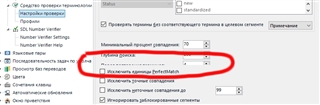
I know what this option means but I'd rather have it fully visible.
Anybody got such kind of a problem?
Thank you.
Regards,
Radian
Generated Image Alt-Text
[edited by: Trados AI at 11:05 PM (GMT 0) on 28 Feb 2024]


