Cannot add own resources to client package in Trados 2021

Hello, 

I am working on a package from a client who uses a previous version of Trados and I installed Trados 2021 at the end of last month. Now it is showing me an error I have never seen when I try to add my local TM to the client package TM: something like "resource for this entry not installed on this machine" and it shows a question mark next to my local TM. It is also not searching my own TM in the Editor view. Plus, the options for adding "Any TM" are gone. Similar problem with termbases. None of my local ones really work here. I have managed to add one by now, but not more than that. I have also tried to add other unrelated local TMs - same problem.

I am generally very disappointed with Trados 2021 and if this is a newly introduced bug, I will be ever more disappointed because there are already things it has un-improved. In any case, I need to get this fixed because I absolutely need to always run my own resources in addition to the package resources. 

Does anyone know anything about this?

Many thanks!

  • It's more helpful if you screenshot the error and copy paste it in here so we can see it properly.  Or even better if you can save the error to your desktop and attach the xml file you save to your reply.

    However, in the absence of anything else it's probably worth trying a reset and a repair.  You could use this app for the reset and a repair and this will also explain what you will lose by carrying out a reset before you do it:

    appstore.sdl.com/.../

    But if you'd rather do this manually then rename this folder (just add _old to the end or something, it's not important what you rename it to) and restart Studio:

    c:\Users\[USERNAME]\AppData\Roaming\SDL\SDL Trados Studio\Studio16

    So the path would become this:

    c:\Users\[USERNAME]\AppData\Roaming\SDL\SDL Trados Studio\Studio16_old

    If you can't find this folder then you need to unhide your hidden files/folders:

    https://www.howtogeek.com/howto/windows-vista/show-hidden-files-and-folders-in-windows-vista/

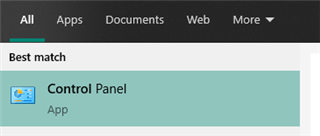
    Then run a repair through the windows control panel.  Don't use the "Add remove programs" from the fancy windows interface as this doesn't offer the right options.  Use the old windows control panel and then add/remove programs:

    Windows search bar showing 'Control Panel' app as the best match for a search query.

    Paul Filkin | RWS

    Design your own training!
    You've done the courses and still need to go a little further, or still not clear? 
    Tell us what you need in our Community Solutions Hub

    emoji


    Generated Image Alt-Text
    [edited by: Trados AI at 11:10 PM (GMT 0) on 28 Feb 2024]