Deactivation of notification column

Hi to you all,

When translating with Studio there is a column on the far right side "Notifications" and "Tips". How can deactivate this column? It happens time and again, when searching a term in Multiterm, I unintenionally open this column which really is unnerving. I know that there is a new version of Studio and I don't need the tips.

Thank you for your help.

Ingrid

Parents Reply
  • Thank you, Ali. I have these screenshots all ready for copying but when I want to insert them in my text here, the insert function is greyed out. That is to say: now it's not greyed out any more... Technology always has a mind of its own.

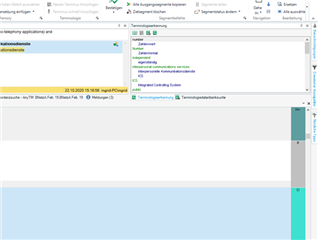
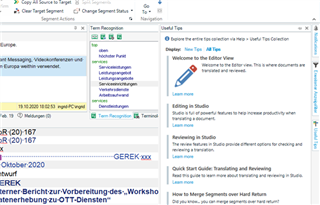
    Now I will repeat my question: How can I rearrange my screen so that the 2 columns on the right are not shown (I never look at the document structure, and I don't need notifications, useful tips etc. ). I'm sure I would find instructions in the huge Manual but that would take very long.

    Now another try with the screenshots, for illustration purposes. 

    Trados Studio interface with the insert function active, showing the settings menu and two columns on the right side including document structure and notifications.

    Trados Studio editor view with helpful tips and notifications on the right, including a welcome message and links to editing features and quick start guides.By the way, now I know what my mistake was. Of course, very stupid, but I will not go into the details. Thanks to all of you for your patience and the replies, and I also wish you a super Sunday.

    Ingrid

    emoji


    Generated Image Alt-Text
    [edited by: Trados AI at 11:14 PM (GMT 0) on 28 Feb 2024]
Children