
 Translate



Dear community,
I have SDL Trados Studio 2019 Version 15.2.7.2849 and MS Windows 10 Pro.
Today I closed Studio when it started taking very long time making new entries into Multiterm.
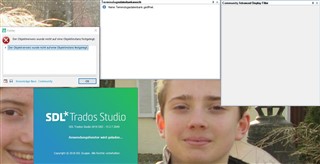
When I tried to re-open Studio, the green logo windows opened and the message “Anwendungsfenster wird geladen …” (application window loaded) appeared. Then two empty windows opened, one “Terminologiedatenbankansicht” (Termbase window) saying “No termbase opened”, and the other one “Community Advanced Display Filter”. Next, an error message appeared saying “Der Objektverweis wurde nicht auf eine Objektinstanz festgelegt”.
All I can do is close this window and try to start Studio again, with the same result.
I tried de-installing and re-installing Studio and Multiterm, with no success. Studio without Multiterm installed gives the same result.
I also tried resetting Windows to a restore point more about 36 hours earlier, without success. There are no older restore points available.
The latest change I made to Studio was installing the “Community Advance Display Filter” two or three days ago, but I don’t know how to de-install it without being able to open Studio.
Below comes the error protocol.
Can anybody please help me?
Many thanks,
Knut Krämer
<?xml version="1.0"?>
<SDLErrorDetails time="24.10.2020 21:35:13"><ErrorMessage>Der Objektverweis wurde nicht auf eine Objektinstanz festgelegt.</ErrorMessage><Exception><Type>System.NullReferenceException, mscorlib, Version=4.0.0.0, Culture=neutral, PublicKeyToken=b77a5c561934e089</Type><HelpLink/><Source>Sdl.Desktop.Platform.WinForms</Source><HResult>-2147467261</HResult><StackTrace><![CDATA[
bei Sdl.Desktop.Platform.WinForms.DockingViewPartPane.set_ViewPartControl(Control value)
bei Sdl.Desktop.Platform.WinForms.DockingViewContentControl.EnsureDockedViewPartControl(DockableControlPane pane)
bei Sdl.Desktop.Platform.WinForms.DockingViewContentControl.Init(IViewWithParts view)
bei Sdl.Desktop.Platform.AbstractDockingView.OnInitControl()
bei Sdl.Desktop.Platform.AbstractViewWithParts.GetContentControl()
bei Sdl.Desktop.Platform.WinForms.ViewPane.set_ViewReference(IViewReference value)
bei Sdl.Desktop.Platform.WinForms.StudioWindowForm.UpdateActiveView()
bei Sdl.Desktop.Platform.WinForms.StudioWindowForm.LoadViews()
bei Sdl.Desktop.Platform.Implementation.StudioWindow.Init(IEventAggregator eventAggregator)
bei Sdl.Desktop.Platform.Implementation.Studio.CreateWindowInternal(Boolean setActive, IEventAggregator eventAggregator)
bei Sdl.Desktop.Platform.Implementation.Studio.Run(ISplashScreen splashScreen, IEventAggregator eventAggregator)
bei Sdl.TranslationStudio.Application.Launcher.RunApplication()
]]></StackTrace></Exception><Environment><ProductName>SDL Trados Studio</ProductName><ProductVersion>15.0.0.0</ProductVersion><EntryAssemblyFileVersion>15.2.7.2849</EntryAssemblyFileVersion><OperatingSystem>Microsoft Windows 10 Pro</OperatingSystem><ServicePack>NULL</ServicePack><OperatingSystemLanguage>1031</OperatingSystemLanguage><CodePage>1252</CodePage><LoggedOnUser>DATEX\kraemer</LoggedOnUser><DotNetFrameWork>4.0.30319.42000</DotNetFrameWork><ComputerName>HANAKO</ComputerName><ConnectedToNetwork>True</ConnectedToNetwork><PhysicalMemory>8217176 MB</PhysicalMemory></Environment></SDLErrorDetails>
<SDLErrorDetails time="24.10.2020 21:35:13">
  <ErrorMessage>Der Objektverweis wurde nicht auf eine Objektinstanz festgelegt.</ErrorMessage>
  <Exception>
    <Type>System.NullReferenceException, mscorlib, Version=4.0.0.0, Culture=neutral, PublicKeyToken=b77a5c561934e089</Type>
    <HelpLink />
    <Source>Sdl.Desktop.Platform.WinForms</Source>
    <HResult>-2147467261</HResult>
    <StackTrace><![CDATA[   bei Sdl.Desktop.Platform.WinForms.DockingViewPartPane.set_ViewPartControl(Control value)
   bei Sdl.Desktop.Platform.WinForms.DockingViewContentControl.EnsureDockedViewPartControl(DockableControlPane pane)
   bei Sdl.Desktop.Platform.WinForms.DockingViewContentControl.Init(IViewWithParts view)
   bei Sdl.Desktop.Platform.AbstractDockingView.OnInitControl()
   bei Sdl.Desktop.Platform.AbstractViewWithParts.GetContentControl()
   bei Sdl.Desktop.Platform.WinForms.ViewPane.set_ViewReference(IViewReference value)
   bei Sdl.Desktop.Platform.WinForms.StudioWindowForm.UpdateActiveView()
   bei Sdl.Desktop.Platform.WinForms.StudioWindowForm.LoadViews()
   bei Sdl.Desktop.Platform.Implementation.StudioWindow.Init(IEventAggregator eventAggregator)
   bei Sdl.Desktop.Platform.Implementation.Studio.CreateWindowInternal(Boolean setActive, IEventAggregator eventAggregator)
   bei Sdl.Desktop.Platform.Implementation.Studio.Run(ISplashScreen splashScreen, IEventAggregator eventAggregator)
   bei Sdl.TranslationStudio.Application.Launcher.RunApplication()]]></StackTrace>
  </Exception>
  <Environment>
    <ProductName>SDL Trados Studio</ProductName>
    <ProductVersion>15.0.0.0</ProductVersion>
    <EntryAssemblyFileVersion>15.2.7.2849</EntryAssemblyFileVersion>
    <OperatingSystem>Microsoft Windows 10 Pro</OperatingSystem>
    <ServicePack>NULL</ServicePack>
    <OperatingSystemLanguage>1031</OperatingSystemLanguage>
    <CodePage>1252</CodePage>
    <LoggedOnUser>DATEX\kraemer</LoggedOnUser>
    <DotNetFrameWork>4.0.30319.42000</DotNetFrameWork>
    <ComputerName>HANAKO</ComputerName>
    <ConnectedToNetwork>True</ConnectedToNetwork>
    <PhysicalMemory>8217176 MB</PhysicalMemory>
  </Environment>
</SDLErrorDetails>
Generated Image Alt-Text
[edited by: Trados AI at 11:13 PM (GMT 0) on 28 Feb 2024]


