
 Translate



Hi everyone,
I'd like to ask a question and hope you could kindly give me an answer.
Sometimes I use Trados Studio to translate manuscripts which are excel files containing 2 columns: A & B. Column A is the original for translation, normally with various formats such as text color, bolt, and Column B is for translated text. While I import the excel file into Trados when creating a project for translation, I always find that the original text's formats (as shown in the fig) are lost and therefore the translated text which are exported can only be plain text without any format.
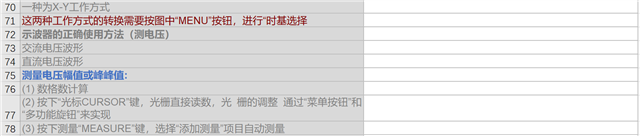
I wanna know if there are some settings in Studio to retain all formats, tags in an original excel file when importing it to the creation of a project so that the translated file can be as is in formats, tags as possible.
Thanks.
Generated Image Alt-Text
[edited by: Trados AI at 11:17 PM (GMT 0) on 28 Feb 2024]



