


How can I configure studio to retain the formats of imported excel file?

Hi everyone,

I'd like to ask a question and hope you could kindly give me an answer.

Sometimes I use Trados Studio to translate manuscripts which are excel files containing 2 columns: A & B. Column A is the original for translation, normally with various formats such as text color, bolt, and Column B is for translated text. While I import the excel file into Trados when creating a project for translation, I always find that the original text's formats (as shown in the fig) are lost and therefore the translated text which are exported can only be plain text without any format.
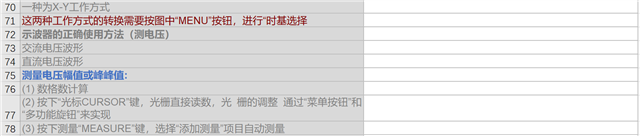
Screenshot of an Excel file with two columns, A and B, showing original text with various formats such as text color and bold in column A, and a blank column B intended for translation.

I wanna know if there are some settings in Studio to retain all formats, tags in an original excel file when importing it to the creation of a project so that the translated file can be as is in formats, tags as possible.

Thanks.


Generated Image Alt-Text
[edited by: Trados AI at 11:17 PM (GMT 0) on 28 Feb 2024]

emoji
Parents
  • Why not simply apply the format of the source to the target, if this is NOT done by default?

    In your case this could be done in two ways: copy source to target and overwrite it OR type the target, select the text to be formatted and press CTRL+, to apply the desired format.

    If your type your target and this appears as plain text, so you need to apply the formatting on your own like described above. You could switch to tagged view, this would most probably explain the issue.

    _________________________________________________________

    When asking for help here, please be as accurate as possible. Please always remember to give the exact version of product used and all possible error messages received. The better you describe your problem, the better help you will get.

    Want to learn more about Trados Studio? Visit the Community Hub. Have a good idea to make Trados Studio better? Publish it here.

Reply
  • Why not simply apply the format of the source to the target, if this is NOT done by default?

    In your case this could be done in two ways: copy source to target and overwrite it OR type the target, select the text to be formatted and press CTRL+, to apply the desired format.

    If your type your target and this appears as plain text, so you need to apply the formatting on your own like described above. You could switch to tagged view, this would most probably explain the issue.

    _________________________________________________________

    When asking for help here, please be as accurate as possible. Please always remember to give the exact version of product used and all possible error messages received. The better you describe your problem, the better help you will get.

    Want to learn more about Trados Studio? Visit the Community Hub. Have a good idea to make Trados Studio better? Publish it here.

Children