Translate



Hi
As a first my experirnce with alignment, I import source and target files, then I connectd the correct contexts to each other and save it to TM. But when I open the TM, I see a few segments are not similar and match as I see in the Alignment view and file. One of the segments in TM shows the wrong context in its segments, while when I click the connected and modified segment in the Alignment view, it’s right.
I close and open Trados Studio, but nothing has changed and those wrong segments in TM still remain and need to modify. Why this happens, while I saved, but TM hasn’t changed those segments in the right way? For example, a text in the target cell is marked with #11 and the right source text for it, is marked with #13 in the Alignment view, when I click on one of those cells, both positing in front of each other as I expect, but TM shows different and non-related context to its equivalent Language!

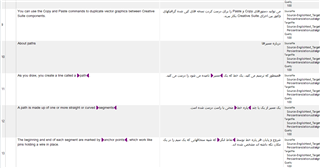
In the above image, cells #11 and #13 were connected and it's okay! but...
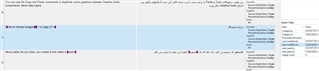
...in the below image, TM doesn't show the right and correct context and text for those, source and target text does not match and it's wrong!
Generated Image Alt-Text
[edited by: Trados AI at 11:19 PM (GMT 0) on 28 Feb 2024]