 Translate



Hi, I am using Trados 2021 and I am trying to translate a new document but cloud TM is not working. Can anyone help, please? it is urgent!!
Generated Image Alt-Text
[edited by: Trados AI at 11:19 PM (GMT 0) on 28 Feb 2024]


Hi, I am using Trados 2021 and I am trying to translate a new document but cloud TM is not working. Can anyone help, please? it is urgent!!
You said it's not working, yet you show a screenshot with it there. Please can you explain what the problem is exactly? When you say it doesn't work what does this mean exactly? What do you see when you look at the settings for this resource?
Paul Filkin | RWS
Design your own training!
You've done the courses and still need to go a little further, or still not clear?
Tell us what you need in our Community Solutions Hub

This, it just doesn´t translate using TM Cloud


this is the settings print

ok - but you're still not showing us your settings. This would be your settings... you can add your MT engines in here:
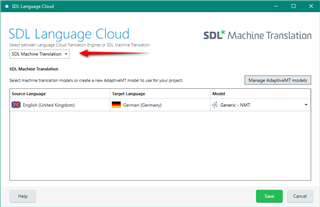
And you can add your Cloud TM:
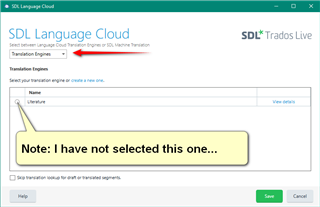
What settings have you added here?
Paul Filkin | RWS
Design your own training!
You've done the courses and still need to go a little further, or still not clear?
Tell us what you need in our Community Solutions Hub

Thank you! I don´t know much about it. Can only do basics. On one language pair, it´s ok. On this other language pair, nope. Where exactly do I go to add these? Also, how do I add cloud termbase?
Have you set up any TMs in the cloud already? I guess this is a good starting point.
Paul Filkin | RWS
Design your own training!
You've done the courses and still need to go a little further, or still not clear?
Tell us what you need in our Community Solutions Hub
I did what I always do for my main language pair. I started the project and set up as you see on the 1st screen. For some reason, it doesn´t show marked. When I started a project on my main pair, it would work as well, so I went to termbase on the top left and added the termbase and cloud MT, and it worked. But not with this project. Oh, And I am not working on Cloud SDL. I am working on a local project.
Until now you have consistently said TM and not MT. Please confirm whether you are just trying to get Machine Translation from Language Cloud or whether you have created a TM in Trados Live in the cloud and are now trying to access this in a local project in Trados Studio? Both are possible but obviously different things that affect my answers to you.
Paul Filkin | RWS
Design your own training!
You've done the courses and still need to go a little further, or still not clear?
Tell us what you need in our Community Solutions Hub
ok, what I am trying to do is to have the machine translation working on a different language pair that I am used to working on. As I showed on the 2nd print, it is not translating automatically. And that's what I am trying to get done. As I said before, on my regular pair, works fine, but not on this one. I am not working on Trados Live, no. I am working on the software on my PC
I am not working on Trados Live, no. I am working on the software on my PC
Trados Live also uses the software on your PC... but the project and resources can also exist in the cloud.
As I showed on the 2nd print, it is not translating automatically.
ok. And what does your settings page look like when you try to add Language Cloud MT to your project. The page I showed you earlier? Were you able to select an MT engine?
Paul Filkin | RWS
Design your own training!
You've done the courses and still need to go a little further, or still not clear?
Tell us what you need in our Community Solutions Hub
I don´t know where those settings are
I don´t know where those settings are
What happens if you remove this and then add it again?
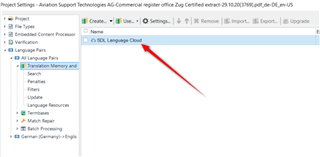
Paul Filkin | RWS
Design your own training!
You've done the courses and still need to go a little further, or still not clear?
Tell us what you need in our Community Solutions Hub
So when you add it back you don't get offered any new window to select an engine? That cannot be right. Please download and install this application through the Studio appstore integration:
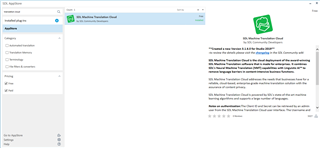
Once installed see if you can add this. It also uses Language Cloud Machine Translation (but offers more functionality).
Paul Filkin | RWS
Design your own training!
You've done the courses and still need to go a little further, or still not clear?
Tell us what you need in our Community Solutions Hub

thank you, I will do. I think it´s not right as well. In other language pairs worked, but not this. Done it. still the same...