 Translate



When it populates amounts with dollar signs for example $1,700 automatically changes it to 1,700$. Is there a way to change it? It takes too much work to change it manually, specially when you work with many.

RWS Community
When it populates amounts with dollar signs for example $1,700 automatically changes it to 1,700$. Is there a way to change it? It takes too much work to change it manually, specially when you work with many.
Auto-localization settings dictate what formats SDL Trados Studio will use during auto-substitution. So you can either decide to switch off auto-substitution of currencies in your TM settings (when deactivating the measurements, this also deactivates the auto-substitution of currencies):

Or you can decide to customize the auto-localization formats. This is a feature introduced in Studio 2021; you can modify the way currencies are handled for a certain language (as well as dates, times, numbers and measurements).
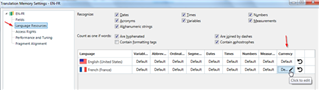
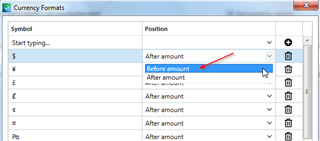
For French, the standard is that a dollar sign comes after the number, but when you click on your TM settings > Language resources, you can change the default settings.
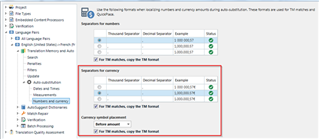
Normally the thousand separator for the French language is a space, but again, this is something you can change, by expanding the settings for your specific language pair, and making the required change in your auto-substitution settings:
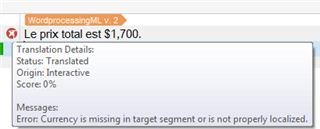
Note that if you ‘go against’ the standards for a certain language, you may get an error message from Studio:
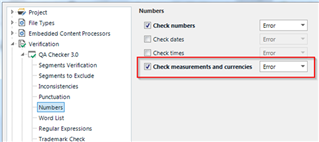
However you can switch off the QA checks for this type of error here:
And of course you can save all these types of custom settings in a project template, so that you don't have to make changes every time...

Auto-localization settings dictate what formats SDL Trados Studio will use during auto-substitution. So you can either decide to switch off auto-substitution of currencies in your TM settings (when deactivating the measurements, this also deactivates the auto-substitution of currencies):
Or you can decide to customize the auto-localization formats. This is a feature introduced in Studio 2021; you can modify the way currencies are handled for a certain language (as well as dates, times, numbers and measurements).
For French, the standard is that a dollar sign comes after the number, but when you click on your TM settings > Language resources, you can change the default settings.
Normally the thousand separator for the French language is a space, but again, this is something you can change, by expanding the settings for your specific language pair, and making the required change in your auto-substitution settings:
Note that if you ‘go against’ the standards for a certain language, you may get an error message from Studio:
However you can switch off the QA checks for this type of error here:
And of course you can save all these types of custom settings in a project template, so that you don't have to make changes every time...
