We have been working with Studio 2017 and I have recently been testing Studio 2019. However I can now no longer import packages in Studio 2017 (I automatically opens 2019) Is there any way to choose the version of Studio to open the package?

I'm afraid there isn't a way out of the box to choose which version of Studio will open when you double-click a package. If you are running multiple versions of Studio then the one that defaults is normally the last one installed, or repaired. Perhaps the best way to work like this, if you really need to continue working with both versions, is to open Studio first and then select the package from Studio rather than from File Explorer or some other file management tool.
I like to use Total Commander where I can set F1 as a keyboard shortcut to save the path to any file or folder. So I work from within Studio but get the path to the files I need in Total Commander and paste them straight into the open file or open package dialog box in Studio. I also use an Autohotkey script to grab the path to the folder in File Explorer and this can also be helpful sometimes, especially as I instinctively use F1:
;------------------------------------------------------------------------------
; Copy path in File Explorer
;------------------------------------------------------------------------------
#IfWinActive ahk_exe explorer.exe
F1::
Send ^l^c
return
#IfWinActive
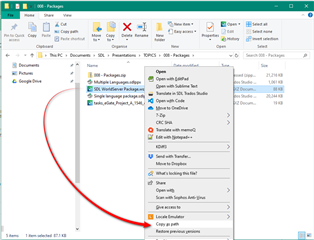
There is a native ability to do this in File Explorer if you hold the shift key down and right-click. This gets you a copy path option:

But I prefer the F1 trick... perhaps that'll be helpful for someone!
Paul Filkin | RWS
Design your own training!
You've done the courses and still need to go a little further, or still not clear?
Tell us what you need in our Community Solutions Hub
I'm afraid there isn't a way out of the box to choose which version of Studio will open when you double-click a package. If you are running multiple versions of Studio then the one that defaults is normally the last one installed, or repaired. Perhaps the best way to work like this, if you really need to continue working with both versions, is to open Studio first and then select the package from Studio rather than from File Explorer or some other file management tool.
I like to use Total Commander where I can set F1 as a keyboard shortcut to save the path to any file or folder. So I work from within Studio but get the path to the files I need in Total Commander and paste them straight into the open file or open package dialog box in Studio. I also use an Autohotkey script to grab the path to the folder in File Explorer and this can also be helpful sometimes, especially as I instinctively use F1:
;------------------------------------------------------------------------------
; Copy path in File Explorer
;------------------------------------------------------------------------------
#IfWinActive ahk_exe explorer.exe
F1::
Send ^l^c
return
#IfWinActive
There is a native ability to do this in File Explorer if you hold the shift key down and right-click. This gets you a copy path option:

But I prefer the F1 trick... perhaps that'll be helpful for someone!
Paul Filkin | RWS
Design your own training!
You've done the courses and still need to go a little further, or still not clear?
Tell us what you need in our Community Solutions Hub