 Translate



Hello!
I have a strange new problem: when I create a project in the settings window and try to select the source language, the sw is immediately closed.
Anybody knows what is happening?

Hello!
I have a strange new problem: when I create a project in the settings window and try to select the source language, the sw is immediately closed.
Anybody knows what is happening?
Sorry... I now found that if I select the source language before deselecting the target language, the system gives me automatically my main language pair. Perhaps it's a new feature?

What version of the software? Seems very odd!
Paul Filkin | RWS
Design your own training!
You've done the courses and still need to go a little further, or still not clear?
Tell us what you need in our Community Solutions Hub
SDL Trados Studio 2019 SR2 - 15.2.7.2849 ?
Paul Filkin | RWS
Design your own training!
You've done the courses and still need to go a little further, or still not clear?
Tell us what you need in our Community Solutions Hub
can you share a screenshot of your wizard immediately prior to selecting the source language? Might help us replicate what you’re doing.
Paul Filkin | RWS
Design your own training!
You've done the courses and still need to go a little further, or still not clear?
Tell us what you need in our Community Solutions Hub

Paul... I took the screenshot, but I don't know how to attach it here... can you tell me how to do it?
Just copy/paste.
Paul Filkin | RWS
Design your own training!
You've done the courses and still need to go a little further, or still not clear?
Tell us what you need in our Community Solutions Hub
Just copy/paste.
Paul Filkin | RWS
Design your own training!
You've done the courses and still need to go a little further, or still not clear?
Tell us what you need in our Community Solutions Hub
doesn't work :-(
no way to attach / insert anything... do you have an email?
Screenshot copy/paste, not a file saved to tour desktop. To load a file use the insert file menu when you reply.
Paul Filkin | RWS
Design your own training!
You've done the courses and still need to go a little further, or still not clear?
Tell us what you need in our Community Solutions Hub
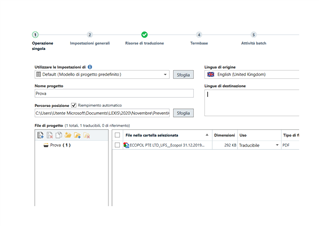

When I click on the drop down list of source languages to change the language from English to Italian, as soon as I click on Italian the program closes!
Similar, but in my case it happened even when I deleted the target language before changing the source language. On the contrary, if I leave the target language and directly go to change the source language, it works... really strange thing! Never happened to me before in years and years of Trados use!
Thanks STEFANO DE ASTIS Valeria Maria Tafel
I can reproduce this:
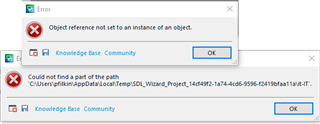
I also found it in the bug database as our reference LG-22367. Seems to occur when you change the source language after removing the target language, so easy enough to avoid. But we should resolve this.
It might also make sense to use project templates, one in each direction you work and then you'll never have to touch the languages and you'll avoid the problem altogether. We still need to fix this of course, but at least the workaround seems productive.
Paul Filkin | RWS
Design your own training!
You've done the courses and still need to go a little further, or still not clear?
Tell us what you need in our Community Solutions Hub
Thank you, Paul!
Of course, it was not a problem that blocked my productivity and, of course, I bypassed it by directly changing the source language.
I just raised the issue because it had never happened before and I did not understand why this bug suddenly appeared the other day... :-))
Have a great week!
Valeria