 Translate



HI,
I tried to open the files located in the "Project templates" folder included in Studio 2021 with Word. It was impossible to open them as they are .sdltpl. My question is how can I restore them and remove Word of them?

HI,
I tried to open the files located in the "Project templates" folder included in Studio 2021 with Word. It was impossible to open them as they are .sdltpl. My question is how can I restore them and remove Word of them?
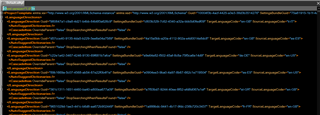
Why did you try to open them in Word? What are you trying to do with them? They are only text files, so if you have a decent text editor (Notepad++, EditPad etc.) you can open them and view the contents. May not be very helpful for you though. This is the default template from my machine for example:
Paul Filkin | RWS
Design your own training!
You've done the courses and still need to go a little further, or still not clear?
Tell us what you need in our Community Solutions Hub

Why did you try to open them in Word? What are you trying to do with them? They are only text files, so if you have a decent text editor (Notepad++, EditPad etc.) you can open them and view the contents. May not be very helpful for you though. This is the default template from my machine for example:
Paul Filkin | RWS
Design your own training!
You've done the courses and still need to go a little further, or still not clear?
Tell us what you need in our Community Solutions Hub

In fact, Ididn't mean to do it. I was just "tidying" my folders.
Now they are "attached" to Word and Studio can't open them. So I was wondering how to "restore" them.

So you get an error message on starting Studio or only when you try to open them in the project template editor?
Either way you could try this:
Paul Filkin | RWS
Design your own training!
You've done the courses and still need to go a little further, or still not clear?
Tell us what you need in our Community Solutions Hub
Did it solve your problem
Paul Filkin | RWS
Design your own training!
You've done the courses and still need to go a little further, or still not clear?
Tell us what you need in our Community Solutions Hub
I have changed the name as you mentioned.
Word is still there.
When I try to open them with Studio, I get a message saying (I translate): "this kind of file is not supported".
But after all, may be it doesn't matter or perhaps they aren't intended to be open by Studio?
Thank you anyway.
I don’t understand why you are trying to open them for translation with Studio?
Paul Filkin | RWS
Design your own training!
You've done the courses and still need to go a little further, or still not clear?
Tell us what you need in our Community Solutions Hub