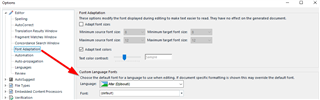
Translate



Hi,
I am using SDL Trados Studio 2021 and have a problem with machine translation which has appeared since Studio 2019.
When I translate English text into Korean, I usually use any of machine translation tools, such as Google Translate, Microsoft Translator, and SDL Language Cloud.
However, the problem occurs as shown below. I don't know why it is happening.
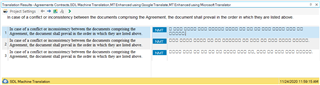
For your information, the source language is English, and the target is Korean. In the target column, weird squares appear instead of Korean characters.
I 'd appreciate if anyone could help me resolve the knotty problem.
Thanks.
Generated Image Alt-Text
[edited by: Trados AI at 11:45 PM (GMT 0) on 28 Feb 2024]