Failed to load project error - Appears constantly.... Why do they get corrupted every time?

Hi all.

As I am working, either:

- Trados crashes mid-project and then won't reopen (so I have to delete the project file I was working on AND the sdlxliff files in order to be able to reopen it, and recreate the project every time) 

or

- When I try to create a new file/project, Trados crashes and won't load again due to the last project I completed ("Failed to load project" error - always the last project I worked on).

It makes it very difficult to be productive as this happens every time now. Does anyone have any ideas as to why these files get corrupted one after the other?

Also when I create a new single file to work on (NOT a project), Trados always creates a project file on the side every time (I wonder wether this is normal, or wether this has something to do with the fact the files are getting repeatedly corrupted?)

Thank you in advance for any insights! Slight smile

  • You don't mention the version of Studio, nor do you provide the full error message.  Maybe one of these is relevant here?

    https://gateway.rws.com/csm?id=kb_article_view&sysparm_article=KB0010205

    https://gateway.rws.com/csm?id=kb_article_view&sysparm_article=KB0036117

    https://gateway.rws.com/csm?id=kb_article_view&sysparm_article=KB0039646

    Paul Filkin | RWS

    Design your own training!
    You've done the courses and still need to go a little further, or still not clear? 
    Tell us what you need in our Community Solutions Hub

  • Apologies, it's Studio 2021. How can I attach a screen shot of the error message?

  • You can copy/paste a screenshot.

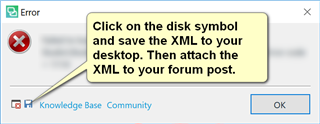
    But if you have the full error message it would be much better if you added the error file so we can read the whole thing properly:

    Error dialog box in Trados Studio with a message instructing to click on the disk symbol to save the XML to desktop and attach it to the forum post.

    Paul Filkin | RWS

    Design your own training!
    You've done the courses and still need to go a little further, or still not clear? 
    Tell us what you need in our Community Solutions Hub

    emoji


    Generated Image Alt-Text
    [edited by: Trados AI at 11:46 PM (GMT 0) on 28 Feb 2024]
  • <SDLErrorDetails time="11/24/2020 10:36:27 PM">
      <ErrorMessage>Failed to load project from '\\Mac\Home\Documents\WORK 2020_2021\O. MONTEL\24 NOVEMBRE\Émile\Lettre Ministre des Mines Exportation ANODES 24 11 2020 Fr.docx_fr-FR_en-GB.sdlproj': 
    Could not find a part of the path '\\mac\Home\Documents\WORK 2020_2021\O. MONTEL\24 NOVEMBRE%EF%80%A1%EF%80%A1%EF%80%A1\Émile\Lettre Ministre des Mines Exportation ANODES 24 11 2020 Fr.docx_fr-FR_en-GB.sdlproj'.</ErrorMessage>
      <Exception>
        <Type>Sdl.ProjectApi.ProjectApiException, Sdl.ProjectApi, Version=16.0.0.0, Culture=neutral, PublicKeyToken=c28cdb26c445c888</Type>
        <HelpLink />
        <Source>Sdl.ProjectApi.Implementation</Source>
        <HResult>-2146233088</HResult>
        <StackTrace><![CDATA[   at Sdl.ProjectApi.Implementation.Repositories.ProjectRepository.Load(String projectFilePath)
       at Sdl.ProjectApi.Implementation.Project.Load(String projectFilePath, Boolean createProjectListItem)
       at Sdl.ProjectApi.Implementation.Project.EnsureLoaded()
       at Sdl.ProjectApi.Implementation.Project.get_Repository()
       at Sdl.ProjectApi.Implementation.AbstractProjectConfiguration.get_Settings()
       at Sdl.ProjectApi.Implementation.Project.get_ProjectOrigin()
       at Sdl.ProjectApi.Implementation.Project.get_IsLCProject()
       at Sdl.ProjectApi.Implementation.Project.get_ProjectType()
       at Sdl.TranslationStudio.Common.ProjectLicenseUtils.IsProjectAllowed(IProject project, String& validationMessage, Boolean showPrompts)
       at Sdl.TranslationStudio.ProjectManagement.ProjectManagementService.RefreshProjects(Boolean raiseEvent)
       at Sdl.TranslationStudio.ProjectManagement.ProjectManagementService.RefreshProjects()
       at Sdl.TranslationStudio.ProjectManagement.ProjectsView.ProjectsListViewPart.Refresh()
       at Sdl.Desktop.Platform.AbstractViewWithParts.RefreshViewPart(IViewPartReference viewPartReference)
       at Sdl.Desktop.Platform.AbstractViewWithParts.Control_ViewPartShown(IViewWithParts view, IViewPartReference viewPartReference)
       at Sdl.Desktop.Platform.WinForms.DockingViewContentControl.OnViewPartShown(IViewPartReference viewPartReference)
       at Sdl.Desktop.Platform.WinForms.DockingViewContentControl.AddSingleCenterViewPart(IViewPartReference viewPartReference)
       at Sdl.Desktop.Platform.WinForms.DockingViewContentControl.AddViewPart(IViewPartReference viewPartReference)
       at Sdl.Desktop.Platform.WinForms.DockingViewContentControl.PopulateViewParts(Boolean reload)
       at Sdl.Desktop.Platform.WinForms.DockingViewContentControl.Init(IViewWithParts view)
       at Sdl.Desktop.Platform.AbstractDockingView.OnInitControl()
       at Sdl.Desktop.Platform.AbstractViewWithParts.GetContentControl()
       at Sdl.Desktop.Platform.WinForms.ViewPane.set_ViewReference(IViewReference value)
       at Sdl.Desktop.Platform.WinForms.StudioWindowForm.UpdateActiveView()
       at Sdl.Desktop.Platform.WinForms.StudioWindowForm.LoadViews()
       at Sdl.Desktop.Platform.Implementation.StudioWindow.Init(IEventAggregator eventAggregator)
       at Sdl.Desktop.Platform.Implementation.Studio.CreateWindowInternal(Boolean setActive, IEventAggregator eventAggregator)
       at Sdl.Desktop.Platform.Implementation.Studio.Run(ISplashScreen splashScreen, IEventAggregator eventAggregator)
       at Sdl.TranslationStudio.Application.Launcher.RunApplication()]]></StackTrace>
        <InnerException>
          <Type>System.IO.DirectoryNotFoundException, mscorlib, Version=4.0.0.0, Culture=neutral, PublicKeyToken=b77a5c561934e089</Type>
          <HelpLink />
          <Source>mscorlib</Source>
          <HResult>-2147024893</HResult>
          <StackTrace><![CDATA[   at System.IO.__Error.WinIOError(Int32 errorCode, String maybeFullPath)
       at System.IO.FileStream.Init(String path, FileMode mode, FileAccess access, Int32 rights, Boolean useRights, FileShare share, Int32 bufferSize, FileOptions options, SECURITY_ATTRIBUTES secAttrs, String msgPath, Boolean bFromProxy, Boolean useLongPath, Boolean checkHost)
       at System.IO.FileStream..ctor(String path, FileMode mode, FileAccess access, FileShare share, Int32 bufferSize)
       at System.Xml.XmlDownloadManager.GetStream(Uri uri, ICredentials credentials, IWebProxy proxy, RequestCachePolicy cachePolicy)
       at System.Xml.XmlUrlResolver.GetEntity(Uri absoluteUri, String role, Type ofObjectToReturn)
       at System.Xml.XmlTextReaderImpl.OpenUrlDelegate(Object xmlResolver)
       at System.Threading.CompressedStack.runTryCode(Object userData)
       at System.Runtime.CompilerServices.RuntimeHelpers.ExecuteCodeWithGuaranteedCleanup(TryCode code, CleanupCode backoutCode, Object userData)
       at System.Threading.CompressedStack.Run(CompressedStack compressedStack, ContextCallback callback, Object state)
       at System.Xml.XmlTextReaderImpl.OpenUrl()
       at System.Xml.XmlTextReaderImpl.Read()
       at System.Xml.XmlTextReader.Read()
       at System.Xml.XmlReader.MoveToContent()
       at Sdl.ProjectApi.Implementation.Migration.AbstractFileMigration.GetFileVersion(String filePath)
       at Sdl.ProjectApi.Implementation.Migration.AbstractFileMigration.Migrate(String filePath)
       at Sdl.ProjectApi.Implementation.Repositories.ProjectRepository.Load(String projectFilePath)]]></StackTrace>
        </InnerException>
      </Exception>
      <Environment>
        <ProductName>SDL Trados Studio</ProductName>
        <ProductVersion>Studio16</ProductVersion>
        <EntryAssemblyFileVersion>16.0.2.3343</EntryAssemblyFileVersion>
        <OperatingSystem>Microsoft Windows 10 Pro</OperatingSystem>
        <ServicePack>NULL</ServicePack>
        <OperatingSystemLanguage>1033</OperatingSystemLanguage>
        <CodePage>1252</CodePage>
        <LoggedOnUser>CLEO8E8C\Clotild1</LoggedOnUser>
        <DotNetFrameWork>4.0.30319.42000</DotNetFrameWork>
        <ComputerName>CLEO8E8C</ComputerName>
        <ConnectedToNetwork>True</ConnectedToNetwork>
        <PhysicalMemory>8388132 MB</PhysicalMemory>
      </Environment>
    </SDLErrorDetails>

  • Hi

    If you look at the error message you posted, Trados Studio is failing to read the "24 NOVEMBRE" part of the path.
    You should be able to fix the problem, by moving the project to a different location that is not under "24 NOVEMBRE".
    Out of curiousity, what are the characters that come after "24 NOVEMBRE" in the folder name?

  • Hi Jesse, the character is *

    I have deleted it and so far it seems to have resolved the problem. Hopefully it is all it was. Thank you! Slight smile

  • Great to hear! 
    The * is not allowed in file paths on Windows, which is why the error occurred (on Mac OS, this character is allowed).