


Problems with word count when importing ppt files into a project

Working on Studio 2019, I'm importing 7 power point files (which seem ok and can be read and modified properly in their original software) in a project.

I get several error messages such as the following :
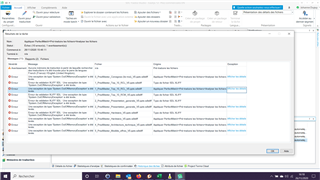
Trados Studio 2019 error message dialog showing multiple errors while importing PowerPoint files, with details such as 'Failed to save target content', 'Object reference not set to an instance of an object', and 'Failed to load SDLXLIFF file'.

All the xliff files generated seem to be ok in the editor. But the word count is 0 for several fils in the report.

I've done the whole process again (recreating the project) and I end up with the same problem (exploitable xliff files but word count = 0) on some of the 7 files but not on the same as in the previous trial.

Thanks in advance for your help.


Generated Image Alt-Text
[edited by: Trados AI at 11:52 PM (GMT 0) on 28 Feb 2024]

emoji
Parents Reply
  • I've had these Out of Memory exceptions in Trados Studio 2019 and I've always been able to overcome these problems.

    First, I restart the PC, something that you've already tried.

    If there are still problems, I add each problematic file to the same project, one at a time.

    If there are still problems with a particular file, I open the original file (in Word, Excel…) and try to find and fix whatever is preventing it to be open in Trados Studio. Once the corrupted file has been fixed, I add it to the same project. This step can take some time, but it has never taken me more than 30 minutes to fix a big Word document.

    When all the files are in Trados Studio, I run an Analyze task for all of them.

Children