 Translate



Hola:
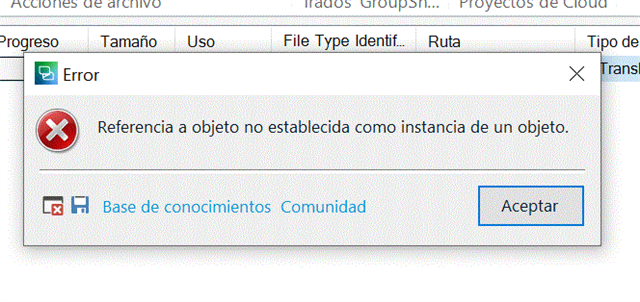
Quiero abrir un proyecto en Studio 2021, cargado previamente desde Trados Live, pero sale el siguiente mensaje. Gracias
Generated Image Alt-Text
[edited by: Trados AI at 11:54 PM (GMT 0) on 28 Feb 2024]


Hola:
Quiero abrir un proyecto en Studio 2021, cargado previamente desde Trados Live, pero sale el siguiente mensaje. Gracias
<SDLErrorDetails time="01.12.2020 11:37:28">
  <ErrorMessage>Referencia a objeto no establecida como instancia de un objeto.</ErrorMessage>
  <Exception>
    <Type>System.NullReferenceException, mscorlib, Version=4.0.0.0, Culture=neutral, PublicKeyToken=b77a5c561934e089</Type>
    <HelpLink />
    <Source>Sdl.ProjectApi.Implementation</Source>
    <HResult>-2147467261</HResult>
    <StackTrace><![CDATA[   en Sdl.ProjectApi.Implementation.FileRevision.IsBilingualFileVersion(IProject project, String fileName)
   en Sdl.ProjectApi.Implementation.FileRevision.get_IsBilingual()
   en Sdl.TranslationStudio.Api.ProjectManagement.Conditions.SelectedNonBilingualFileCondition.AreFilesSupported(IProjectFile[] files)
   en Sdl.TranslationStudio.Api.ProjectManagement.Conditions.SelectedFileCondition.GetValue()
   en Sdl.Desktop.Platform.Extensions.AbstractCondition.UpdateValue()
   en Sdl.TranslationStudio.Api.ProjectManagement.Conditions.SelectedFileCondition.UpdateActiveView()
   en Sdl.TranslationStudio.Api.ProjectManagement.Conditions.SelectedFileCondition.Window_ActiveViewChanged(Object sender, EventArgs e)
   en System.EventHandler.Invoke(Object sender, EventArgs e)
   en Sdl.Desktop.Platform.Implementation.StudioWindow.OnActiveViewChanged()
   en Sdl.Desktop.Platform.Implementation.StudioWindow.set_ActiveView(IViewReference value)
   en Sdl.TranslationStudio.ProjectManagement.ProjectManagementService.SwitchToFileView()
   en Sdl.TranslationStudio.ProjectManagement.ProjectsView.ProjectsListViewPart.<>c__DisplayClass18_0.<_control_DefaultAction>g__SwitchToFilesView|0()
   en Sdl.TranslationStudio.ProjectManagement.ProjectsView.ProjectsListViewPart._control_DefaultAction(Object sender, EventArgs e)
   en Sdl.Desktop.Common.DataList.OnDefaultAction(EventArgs e)
   en Sdl.Desktop.Common.DataList.BodyControl.OnDoubleClick(EventArgs e)
   en System.Windows.Forms.Control.WmMouseUp(Message& m, MouseButtons button, Int32 clicks)
   en System.Windows.Forms.Control.WndProc(Message& m)
   en System.Windows.Forms.ScrollableControl.WndProc(Message& m)
   en System.Windows.Forms.ContainerControl.WndProc(Message& m)
   en System.Windows.Forms.UserControl.WndProc(Message& m)
   en System.Windows.Forms.Control.ControlNativeWindow.OnMessage(Message& m)
   en System.Windows.Forms.Control.ControlNativeWindow.WndProc(Message& m)
   en System.Windows.Forms.NativeWindow.Callback(IntPtr hWnd, Int32 msg, IntPtr wparam, IntPtr lparam)]]></StackTrace>
  </Exception>
  <Environment>
    <ProductName>SDL Trados Studio</ProductName>
    <ProductVersion>Studio16</ProductVersion>
    <EntryAssemblyFileVersion>16.0.2.3343</EntryAssemblyFileVersion>
    <OperatingSystem>Microsoft Windows 10 Home</OperatingSystem>
    <ServicePack>NULL</ServicePack>
    <OperatingSystemLanguage>3082</OperatingSystemLanguage>
    <CodePage>1252</CodePage>
    <LoggedOnUser>FRANZ-LAPTOP\franc</LoggedOnUser>
    <DotNetFrameWork>4.0.30319.42000</DotNetFrameWork>
    <ComputerName>FRANZ-LAPTOP</ComputerName>
    <ConnectedToNetwork>True</ConnectedToNetwork>
    <PhysicalMemory>8216460 MB</PhysicalMemory>
  </Environment>
</SDLErrorDetails>
Hi, Steven. See attached.
Thanks,
Francisco

Hello Francisco ANAYA ,
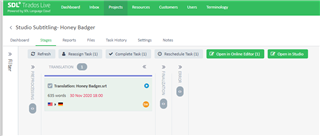
When you open Trados Live, are you able to see the project? and what status does this have?
When you click on Open in Studio - does this work for you?
Oana Nagy | QA Engineer | RWS Group

Hi, Steven,
I can see the project as you show and it can be open with the online editor, but not with Studio. It appears the above message, the first one. And the same when I try to open it directly from Studio.
Thanks,
Fran
Hi, Steven,
I can see the project as you show and it can be open with the online editor, but not with Studio. It appears the above message, the first one. And the same when I try to open it directly from Studio.
Thanks,
Fran