Migrating from Studio 2019 to Studio 2021

I am upgrading from studio 2019 to 2021.

I am currently working on a HUGE project that of course, I do not want to lose any information.

I have deactivated my 2019 license and activated my 2021 license.

How do I open my project in the new 2021 without losing all the updated TMs units?

What kind of file should I use?

Parents
  • In my opinion you should not.  Just finish working on 2019 and complete your ongoing projects.  Then just start all new projects on 2021.  If you have 2019 installed on the same computer as 2021 then it will run by virtue of 2021 being licenced.

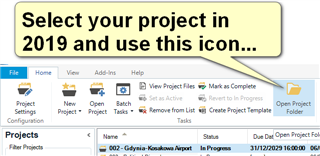
    But, if you're determined, just use the "Open Project" command from the ribbon in 2021 and look for the sdlproj file of your 2019 project.  It's probably a good idea to make sure you know where the project is saved before you do this so can easily find it.

    Trados Studio 2019 interface showing the 'Open Project' icon highlighted with a yellow arrow and text bubble saying 'Select your project in 2019 and use this icon...'.

    This will open the project location in windows explorer and you'll find the sdlproj in there.  Don't move it... it only contains metadata... but Studio 2021 will be able to read it and will open your project along with the resources yo used.

    Paul Filkin | RWS

    Design your own training!
    You've done the courses and still need to go a little further, or still not clear? 
    Tell us what you need in our Community Solutions Hub

    emoji


    Generated Image Alt-Text
    [edited by: Trados AI at 11:57 PM (GMT 0) on 28 Feb 2024]
  • Thank you very much, Paul, for your quick reply!

    Unfortunately, I have already deactivated my Studio 2019 license, so as not to go back to the hassle of asking for a new license, I followed the instructions you gave me to start working in 2021.

    I panicked a little when I couldn't use de Google API, but then I found your thread on this subject, and everything is working perfectly now.

    You are a Master!

    Thank you very much.

    Carlos

Reply Children