


Is my TM updating or not?

Good day, I'm new here, having just purchased Trados. I have a few questions, starting with this one.(Thanks to Paul for his advice on posting.)

A TM viewed in the  "Translation Memories" persistently shows no change since the update on 4 Dec even though I have tried numerous times to update it, including by realigning and importing from Alignment, and by redoing the translation.
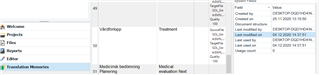
Trados Studio interface showing Translation Memories window with a Swedish-English TM selected, last modified date displayed as 4 Dec.

However, in the Translation Memories folder it duly shows as modified today, 6 Dec, and when I reopen the original to check it by  "translating" it again, I get 100% matches from an apparently updated TM.
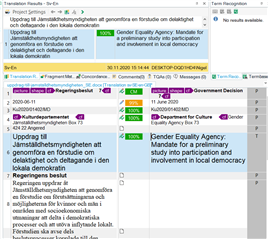
Trados Studio translation segment window displaying 100% matches from the TM, indicating the TM has been updated despite the displayed date.

None of the segments from this document appear in the Sv-En TM open in the Translation Memories window, in screenshot 1 above.

These are the Project Settings (nothing under All Language Pairs).
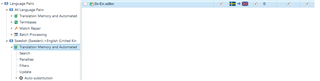
Trados Studio Project Settings showing Swedish-English language pair with Translation Memory and Automated Translation options.

Should I even expect the TM view to show the updated TM? If not, I won't worry.

In general I confess I find the TM settings mysterious and overcomplicated. Considering they are the raison d'être of the software, I would have preferred them to be simpler to set up. Why, for example, is this TM is listed under Swedish-English and not under All Language Pairs (i.e., what did I do to make that happen?!)? What is the difference between Project TMs and Main TMs, about which a dialog box pops up, asking me for some sort of choice when updating?

Any thoughts?

Thanks and regards

Nigel


Generated Image Alt-Text
[edited by: Trados AI at 11:59 PM (GMT 0) on 28 Feb 2024]
emoji
Parents
  • Thanks for posting with this detail... it does help to come up with some ideas.

    First of all... you do know that the TM Maintenance View is only a maintenance view and it works on a page by page basis.  So you will only ever see the first page... and however many TUs you have this set for.  So try navigating to the end:

    Screenshot of Trados Studio showing the TM Maintenance View with a tooltip for Navigation and Pagination options.

    Apologies if that is a silly idea for you...

    Another idea would be check whether you are using a Project TM or not.  If you are then your Main T will not be updated until you either Finalize the project or run the Update Main TM batch task.  But looking at your project settings you don't seem to be doing this.

    Paul Filkin | RWS

    Design your own training!
    You've done the courses and still need to go a little further, or still not clear? 
    Tell us what you need in our Community Solutions Hub

    emoji


    Generated Image Alt-Text
    [edited by: Trados AI at 11:59 PM (GMT 0) on 28 Feb 2024]
Reply
  • Thanks for posting with this detail... it does help to come up with some ideas.

    First of all... you do know that the TM Maintenance View is only a maintenance view and it works on a page by page basis.  So you will only ever see the first page... and however many TUs you have this set for.  So try navigating to the end:

    Screenshot of Trados Studio showing the TM Maintenance View with a tooltip for Navigation and Pagination options.

    Apologies if that is a silly idea for you...

    Another idea would be check whether you are using a Project TM or not.  If you are then your Main T will not be updated until you either Finalize the project or run the Update Main TM batch task.  But looking at your project settings you don't seem to be doing this.

    Paul Filkin | RWS

    Design your own training!
    You've done the courses and still need to go a little further, or still not clear? 
    Tell us what you need in our Community Solutions Hub

    emoji


    Generated Image Alt-Text
    [edited by: Trados AI at 11:59 PM (GMT 0) on 28 Feb 2024]

Children
