Is my TM updating or not?

Good day, I'm new here, having just purchased Trados. I have a few questions, starting with this one.(Thanks to Paul for his advice on posting.)

A TM viewed in the  "Translation Memories" persistently shows no change since the update on 4 Dec even though I have tried numerous times to update it, including by realigning and importing from Alignment, and by redoing the translation.
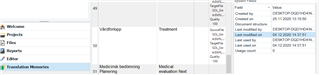
Trados Studio interface showing Translation Memories window with a Swedish-English TM selected, last modified date displayed as 4 Dec.

However, in the Translation Memories folder it duly shows as modified today, 6 Dec, and when I reopen the original to check it by  "translating" it again, I get 100% matches from an apparently updated TM.
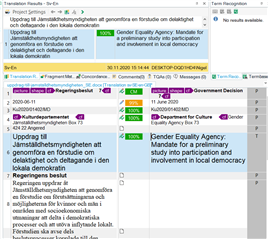
Trados Studio translation segment window displaying 100% matches from the TM, indicating the TM has been updated despite the displayed date.

None of the segments from this document appear in the Sv-En TM open in the Translation Memories window, in screenshot 1 above.

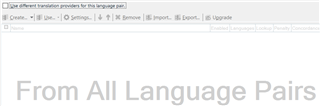
These are the Project Settings (nothing under All Language Pairs).
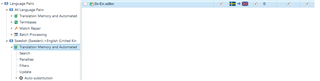
Trados Studio Project Settings showing Swedish-English language pair with Translation Memory and Automated Translation options.

Should I even expect the TM view to show the updated TM? If not, I won't worry.

In general I confess I find the TM settings mysterious and overcomplicated. Considering they are the raison d'être of the software, I would have preferred them to be simpler to set up. Why, for example, is this TM is listed under Swedish-English and not under All Language Pairs (i.e., what did I do to make that happen?!)? What is the difference between Project TMs and Main TMs, about which a dialog box pops up, asking me for some sort of choice when updating?

Any thoughts?

Thanks and regards

Nigel


Generated Image Alt-Text
[edited by: Trados AI at 11:59 PM (GMT 0) on 28 Feb 2024]
emoji
Parents
  • Nigel, for daily work, you should never use the Translation Memories View. It's for highly specialized tasks, not for keeping track of what's in your TM. Instead, stay in the Editor View and use the concordance search function (F3) to look up phrases in your TM to make sure they're in there.

    Your observation that the TM settings are mysterious and overcomplicated is exactly right. One piece of advice: never use a Project TM. That's a special feature that only project managers need.

  • Nigel, for daily work, you should never use the Translation Memories View. It's for highly specialized tasks, not for keeping track of what's in your TM. Instead, stay in the Editor View and use the concordance search function (F3) to look up phrases in your TM to make sure they're in there.

    Your observation that the TM settings are mysterious and overcomplicated is exactly right. One piece of advice: never use a Project TM. That's a special feature that only project managers need.

    While I agree with most of these statements, I strongly disagree with the info about a project TM. This is a highly useful feature, if you simply understand how it works. When using a project TM, only your final and checked translation will update your main TM, while all the drafts you may create during the translation process including all possible errors will just fill the project TM.

    _________________________________________________________

    When asking for help here, please be as accurate as possible. Please always remember to give the exact version of product used and all possible error messages received. The better you describe your problem, the better help you will get.

    Want to learn more about Trados Studio? Visit the Community Hub. Have a good idea to make Trados Studio better? Publish it here.

  • Thanks Jerzy, so if I understand right, the project TM is essentially a temporary TM that helps you to track your translation choices in the current project, which will aid consistency, while the main TM is for storing your final decisions, which will feed into future jobs. Correct?

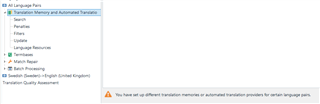
    Could you help me with a couple of other points? What does the warning "You have set up..." etc., at the bottom of the "All language pairs > Translation memories" view mean?

    Trados Studio warning message at the bottom of 'All Language Pairs > Translation Memories' view stating 'You have set up different translation memories or automated translation providers for certain language pairs.'

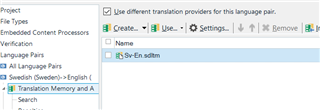
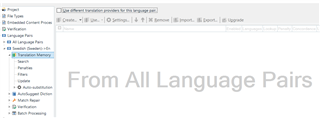
    Then, in the "Swedish-English > Translation memories" view, what does "Use different translation providers.." mean? When I uncheck it, the box fills with a message "From All Language Pairs".

    Trados Studio 'Swedish-English > Translation Memories' view with 'Use different translation providers for this language pair' checkbox checked and a single TM named 'Sv-En.sdltm' listed.

    Trados Studio 'Swedish-English > Translation Memories' view with 'Use different translation providers for this language pair' checkbox unchecked, displaying a message 'From All Language Pairs'.

    I should say that I set this "project" up before really knowing anything about Trados, just following the invitation "Translate single document", as a way of getting into it. So the settings are a bit random and if there are useful pages in the Documentation/manuals on this then by all means just send links. Thanks. .

    emoji


    Generated Image Alt-Text
    [edited by: Trados AI at 12:00 AM (GMT 0) on 29 Feb 2024]
  • What does the warning "You have set up..." etc., at the bottom of the "All language pairs > Translation memories" view mean?

    Warning message in Trados Studio stating 'You have set up different translation memories or automated translation providers for certain language pairs.'

    Then, in the "Swedish-English > Translation memories" view, what does "Use different translation providers.." mean? When I uncheck it, the box fills with a message "From All Language Pairs".

    Checkbox labeled 'Use different translation providers for this language pair' in Trados Studio's Swedish-English translation memory settings.

    Message in Trados Studio reading 'From All Language Pairs' when 'Use different translation providers for this language pair' is unchecked.

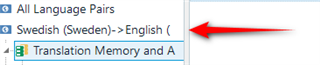
    These are all related.  They are all because you added your TM at the specific language pair here:

    Arrow pointing to the 'Swedish-English' language pair under 'All Language Pairs' in Trados Studio.

    As opposed to at the All Language Pairs level here:

    Arrow pointing to the 'All Language Pairs' option in Trados Studio indicating where to add translation memory for multilingual projects.

    Adding at All Language Pairs carries advantages if you work with multilingual projects as you can apply the same settings for all language pairs as opposed to having to change the settings for each individual language pair you work with.  If you only work with a single language pair it makes little difference... other than adding a little complexity for the majority of users who don't work with multilingual projects.

    So you get this message on the All Language Pair level because you added your TM to the specific language pair:

    Close-up of the warning message in Trados Studio about different translation memories for certain language pairs.

    You get this because if it was unchecked you would be drawing settings from the All Language Pairs:

    Close-up of the checkbox in Trados Studio for using different translation providers for a specific language pair.

    For example:

    Close-up of the message 'From All Language Pairs' in Trados Studio when the checkbox for different translation providers is unchecked.

    Make sense?

    Paul Filkin | RWS

    Design your own training!
    You've done the courses and still need to go a little further, or still not clear? 
    Tell us what you need in our Community Solutions Hub

    emoji


    Generated Image Alt-Text
    [edited by: Trados AI at 12:00 AM (GMT 0) on 29 Feb 2024]
  • Yes, thanks Paul. At least, it will make more sense as I create more projects and see what happens with the different settings.

    Much appreciated.

    Nigel

Reply Children
No Data