
 Translate



Hello,
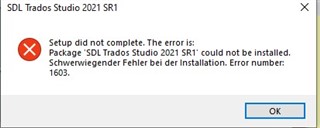
I would ask you people to walk me through the SR1 installation. The execution of the installation process is aborted at some point (not anywhere near the end of it, I believe).
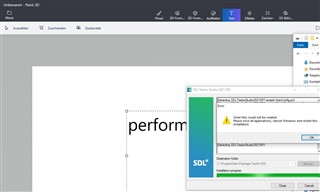
I run the executable as an Admin. The installer at some point performs a rollback and then ... see attached. NB: Screenshot shows the situation after a Non-Admin installation failing. ("Als Administrator ausführen" in the original language of the operating system, Windows 10 Pro, not having been selected for the installer).
Service Releases are essential to have for me, although I also try to keep up with most other updates, with a bit of delay.
I had a look here https://gateway.rws.com/csm?id=kb_article_view&sysparm_article=KB0029227 but this does not help me as it requires advanced IT skills and mine are just plain "good".
Cheers,
Sebastian Witte
Generated Image Alt-Text
[edited by: Trados AI at 12:01 AM (GMT 0) on 29 Feb 2024]



