 Translate



I know where is the list of the keyboard shortcuts but for inserting a symbole like • I don’t know how to do ?
In the list, I find Alt+-Maj+1 or 2 etc. but which symbole is it ? It doesn’t work when I use these shortcuts.
Can sombody help ?

I know where is the list of the keyboard shortcuts but for inserting a symbole like • I don’t know how to do ?
In the list, I find Alt+-Maj+1 or 2 etc. but which symbole is it ? It doesn’t work when I use these shortcuts.
Can sombody help ?
Hello Laurence Pokorny,
There is a limit of 9 character/symbols that can be added via shortcut
Once you open a file and go to the advanced tab- Select your desired symbol- and then INSERT.
These now appears on the ribbon
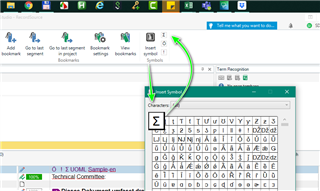
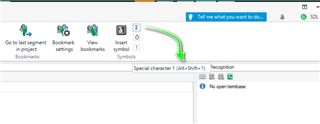
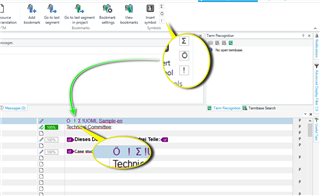
Now you can use the shortcut ALT+SHIFT+1 (ALT+SHIFT+2 etc) to insert into the document
Oana Nagy | QA Engineer | RWS Group

Hello Laurence Pokorny,
There is a limit of 9 character/symbols that can be added via shortcut
Once you open a file and go to the advanced tab- Select your desired symbol- and then INSERT.
These now appears on the ribbon
Now you can use the shortcut ALT+SHIFT+1 (ALT+SHIFT+2 etc) to insert into the document
Oana Nagy | QA Engineer | RWS Group

