Translate



Hi all,
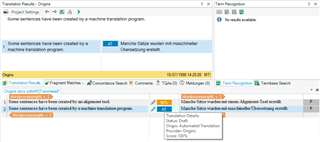
I have a client who sends me TMX files with every job containing machine-translations (created by the client's proprietary machine-translation engine) of all segments in the job. These segments have a CreationID of "MT!", which marks them as machine translations. Before starting work, I import these TMX files into the TM for the job. With Studio 2019, these segments would appear as AT (automated translation) in the editor, making it easy to see that they are machine translations that should be reviewed closely. The client's TM would also contain fuzzies and 100% matches which would be presented correctly as such.
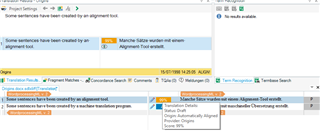
After I upgraded to Studio 2021, the machine-translated segments are being presented as 100% matches, making it impossible to identify them and to distinguish them from real 100% matches during translation work.
As far as I remember, I never changed any settings in Studio 2019 to get it to recognize machine-translated segments and mark them as AT, so I don't know what I can do to get the same behavior in Studio 2021, if anything. Can anyone help?
Thanks a lot in advance!
Best,
Dennis