Phase the sentence start with a Chinese character ?

Hi, 

I have a txt file, with English and Chinese character in different lines, I want to filter the lines start with Chinese characters.

I use the regex starts like this: ^.*?([\u4e00-\u9fa5])  , but the first character will also be filtered, How to solve this problem? thanks.

Parents Reply
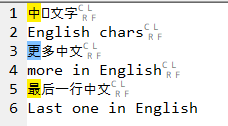
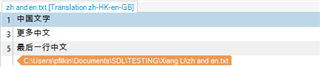
  • ok - now I understand what you mean.  Very strange.  I open the file in Studio and see this:

    Trados Studio interface showing a list of segments with both English and Chinese characters.

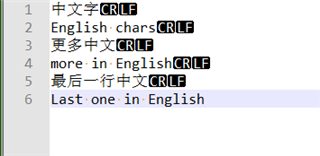
    I filter and I see this:

    Filtered view in Trados Studio displaying only segments with Chinese characters.

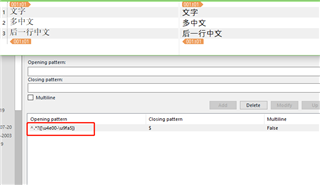
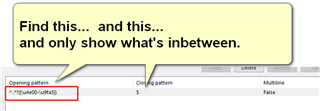
    No chars missing.  However, I also see that you didn't mean filter at all... you created a filetype rule that says this:

    Trados Studio custom filetype rule dialog box with a regex pattern entered in the 'Opening pattern' field.

    So the filetype has done exactly what you asked it to do.  It excluded what it found.

    If you use the same expression in the Advanced Display Filter then you will get exactly what you wanted.

    If you are determined to solve this using a custom filetype then use this rule instead

    Trados Studio interface showing a modified custom filetype rule with a new regex pattern.

    (?=[\u4e00-\u9fa5])+

    $

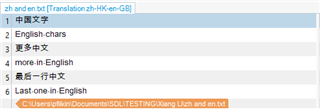
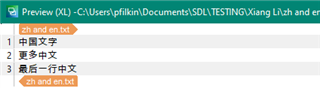
    Then you get this:

    Preview in Trados Studio after applying the new custom filetype rule, displaying segments with Chinese characters.

    I don't actually want to capture Chinese chars as this will exclude them in this feature.  So instead I just use a positive lookahead to verify they are there and if they are I extract the segment.

    Paul Filkin | RWS Group

    ________________________
    Design your own training!

    You've done the courses and still need to go a little further, or still not clear? 
    Tell us what you need in our Community Solutions Hub

    emoji


    Generated Image Alt-Text
    [edited by: Trados AI at 12:24 AM (GMT 0) on 29 Feb 2024]
Children