Auto Segmentation after a Specific String of Characters - Trados Studio 2021

Hi,

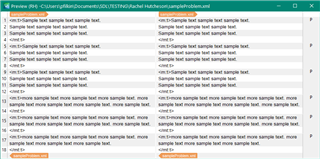
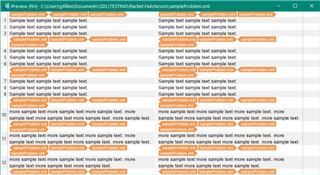
I regularly have to translate files which have been imported from another translation software and feature strings of random characters within segments, e.g. </mt:t><mt:p/><mt:b><mt:t>.

I want to make it so that Trados automatically starts a new segment after these characters but cannot figure out how to do it.  I think that they represent the presence of bullet points in the original software but this has not transferred well into Trados.  I cannot delete them because I need to be able to transfer the translation back into the original software at the end.

Is anyone able to tell me how to make Trados automatically start a new segment after these characters?  It would make my life so much easier if someone was able to show me how and I would be eternally grateful!  The files are imported as .xml.sdlxliff files.

Thank you in advance.

Parents
  • Hi Daniel,

    I receive the files as .mdb files and use the company's translation tool to convert them to .xml files.  I then import the .xml files into Trados.

    I hope this helps.

    Rachel

  • I then import the .xml files into Trados.

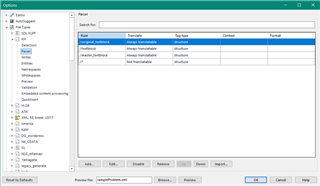
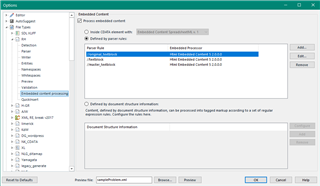
    Perfect.  In this case you should create a custom XML for your XML files and create rules to handle the tags in the way you'd like them to be handled.  If you can provide a sample of the XML file it'll be easier to explain what you need to do?

    Paul Filkin | RWS

    Design your own training!
    You've done the courses and still need to go a little further, or still not clear? 
    Tell us what you need in our Community Solutions Hub

  • I'm not sure I understand what you mean by a sample of the XML file.  I can't send you the file itself as that would breach confidentiality.  Do you mean an excerpt from the text?

  • I'm not sure I understand what you mean by a sample of the XML file.

    This would be a small sample of a file:

    <?xml version="1.0" encoding="UTF-8"?>
    <rootelement>
    <story_one>
      <title>This is a confidential title</title>
      <description status='top secret' >The topic in this element must not be shared with anyone as it’s highly confidential</description>
      </story_one>
    </rootelement>

    Do you mean an excerpt from the text?

    No I mean a sample of the file so I can see the structure.  A small snippet as I showed above would be fine... but just anonymise the text:

    <?xml version="1.0" encoding="UTF-8"?>
    <rootelement>
    <story_one>
      <title>A poem</title>
      <description status='top secret' >Mary had a little lamb its fleece was white as snow</description>
      </story_one>
    </rootelement>

    I'm not interested in the text in the file at all.  Just the structure of the file.  So open it with a text editor, save as a new file so you have a copy, then delete all the lines apart from a representative sample of what the structure looks like.  Finally, with the few lines you are now providing just anonymize the text.

    Paul Filkin | RWS

    Design your own training!
    You've done the courses and still need to go a little further, or still not clear? 
    Tell us what you need in our Community Solutions Hub

Reply
  • I'm not sure I understand what you mean by a sample of the XML file.

    This would be a small sample of a file:

    <?xml version="1.0" encoding="UTF-8"?>
    <rootelement>
    <story_one>
      <title>This is a confidential title</title>
      <description status='top secret' >The topic in this element must not be shared with anyone as it’s highly confidential</description>
      </story_one>
    </rootelement>

    Do you mean an excerpt from the text?

    No I mean a sample of the file so I can see the structure.  A small snippet as I showed above would be fine... but just anonymise the text:

    <?xml version="1.0" encoding="UTF-8"?>
    <rootelement>
    <story_one>
      <title>A poem</title>
      <description status='top secret' >Mary had a little lamb its fleece was white as snow</description>
      </story_one>
    </rootelement>

    I'm not interested in the text in the file at all.  Just the structure of the file.  So open it with a text editor, save as a new file so you have a copy, then delete all the lines apart from a representative sample of what the structure looks like.  Finally, with the few lines you are now providing just anonymize the text.

    Paul Filkin | RWS

    Design your own training!
    You've done the courses and still need to go a little further, or still not clear? 
    Tell us what you need in our Community Solutions Hub

Children