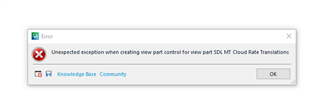
Unexpected exceptions when creating view part SDL MT Cloud Rate Translations

I have lost my Editor screen completely

Error message is Unexpected exceptions when creating view part SDL MT Cloud Rate Translations

I followed these suggestions but not working:

https://gateway.rws.com/csm?id=kb_article_view&sysparm_article=KB0036004.

Help please

Parents Reply
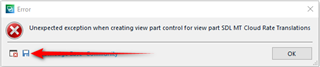
  • I know this is frustrating, but your approach to solving this is not helpful for you or us.  We are not the technical support team, but we want to help you and if we can'tthen we canarrange for a technical support engineer to take a look.  So first of all please try resetting Studio.  It looks as though you have installed a plugin, the version of which we don't know, and the version of Studio we don't know.  You can help here by saving the proper error message to your desktop and then we can read it in a sensible way and take the information from it that might help.  You do that by clicking on this icon, save the xml error file to your desktop and then use the insert menu in the forum post to save it so we can read it:

    Error dialog box in Trados Studio with a message 'Unexpected exception when creating view part control for view part SDL MT Cloud Rate Translations' and an 'OK' button.

    You can also uninstall this plugin for the time being and see whether this is the only thing causing your issues?  Certainly we need to approach this logically as we have no idea what you else you might have installed on your computer that could be contributing to your problems and the error stacks can be useful.

    Paul Filkin | RWS

    Design your own training!
    You've done the courses and still need to go a little further, or still not clear? 
    Tell us what you need in our Community Solutions Hub

    emoji


    Generated Image Alt-Text
    [edited by: Trados AI at 12:36 AM (GMT 0) on 29 Feb 2024]
Children
No Data