How can I persuade Studio to add incremental files from a package to an existing project?

Some of my projects span many files, and are handed off by the client over a period of weeks. These files go into a folder in my "Ongoing" work directory. I give the folder a descriptive name according to a strict format that includes multiple fields separated by underscores. These contain the due date/time and ends in a word count (well, this is JP-EN, so actually a character count), like this:

A _ 2021-01-15 0900 JST _ 2021-01-09 1600 JST _ Client, PM name _ PO number, End client _ document type _ 6600

When I am delivering in tranches, I might have 4,000 characters to do by Tuesday, another 3,000 by Thursday and a final burst of 5,000 to do over the weekend by Monday. At each delivery stage I return an incremental package to the client.

What this means is that I change the folder name multiple times over the course of the project to update the due date (the first date in the folder name above) and the number of characters due by that date. This allows me to immediately see, by looking at the folder names, what I need to deliver on what dates. In a seasonally busy month such as May I may be dealing with an average of one or more projects every day, so this really helps me to maintain a firm grasp of my schedule.

Sometimes clients will send me additional files in package form, but Studio usually manages to incorporate these increments to the project despite changes to the folder name. This morning was an exception. The client has sent half-a-dozen additional files, and when I unpacked it Studio prompted me for a folder name instead of automagically unpacking it into the existing folder. I can't add them to the existing project.

This prompted me to come here to ask two questions.
1) What is the mechanism by which Studio tracks projects and additions to existing projects? I'm guessing it maintains a little database of some kind with unique IDs (I can see that the .proj file contains one or more PackageGuid values), but it would be interesting to know how it works.

2) In cases such as this, is it possible to "persuade" Studio to accept a package as an update to an existing project? For example, can I manually edit the proj file for the new package to make it work, or perhaps rename the existing folder so that the new package recognises the folder, or in some way point the package to the existing folder? (I realise that this is not standard practise and could lead to tears before bedtime, and that all actions would be performed at my own risk, etc.)

Comments and discussion invited from Paul and other SDL staff, but also from my more knowledgeable peers (i.e. most of you).

Thanks in advance...

Dan

PS usual issue - cannot share files, etc. for reasons of confidentiality

PPS changed title to make it more action-based and specific

Parents

  • Thank you for your excellent questions. I will be honest this is falls squarely into Project Management and File Management. Areas of which have no single perfect solution, as yet.

    From your descriptions I acknowledge 2 key areas:

    1. Workload Status Quo
    2. Project Updates


    1. Workload Status Quo

    Firstly let me say that I find it fascinating that you preserver with the repetitive and detailed task of renaming folders for what I understand, is to have a single view by which you can glance over and assess your priorities/workload/current state.

    Questions: Did I summaries this correctly? Does renaming of folders, cause extra effort opening the projects from within Studio?

    I acknowledge you have a number of variables that you manage:

    • End date
    • Client
    • PO
    • Doc Type
    • Word count

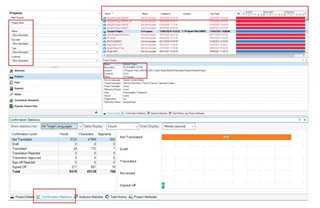
    Most of which can be accessed within the single view of the projects UI, with the added benefit that some of the variables can be part of searchable field or/with filtering supported.

    Screenshot of Trados Studio project management interface showing a list of projects with details such as end date, client, PO, doc type, and word count. A heatmap and task list are visible at the bottom.

    I am thinking about what features are there, in our other solution portfolios that aim to help drive user’s
    priorities.

    At a minimum I recall:

    • Dashboards, heatmap
    • Dedicated Task Lists
    • Extended search functionality

    Question: While you may still choose to manage your projects in your established manner, do you have any thoughts on how we can better support, your reasons for wanting to manage folder names as you do, using SDL Trados Studio?

    1. Project Updates

    The demand for flexibility has been on the rise ever since chunking projects or as you say tranches, became normalised. While users were always able to add new files to existing projects since SDL Trados Studio 2019 we welcomed the ability to update source file(s) mid project with the feature known as “Update File”.  

    However this feature only works in the scenario where the client sends you adapted/additional native source files. With this in mind I am puzzled how you manage the following statement, “Clients will send you additional files in package form, but Studio usually manages to incorporate these to the project.”

    A short falling I recognise is that by using only SDL Trados Studio (no other solution product) we are unable to support incremental project files to the degree that I think you would find most ideal.

    Request: Perhaps if you can clarify the steps you and your client take when it comes to package sharing/adding new files we can see if there are any long term ideals.

    This brings me to your 2 specific questions. Here are my unsophysitced explanations

    1. What is the mechanism by which Studio tracks projects and additions to existing projects?

    There is nothing complicated about the process. What I am sure about is the following:

    • When your projects are established in SDL Trados Studio, they are recorded within:
      C:\Users\[username]\Documents\Studio 20xx\Projects\projects.xml

    This file gives the project view in SDL Trados Studio the list of active projects you are working on.  Much like a short cut. It relies both on location and project name as seen under ProjectFilePath

    • The *.sdlproj that you speak of, reflects all the settings that fell part of the project including source file names.

    • While it is possible to have 2 projects with the same name in SDL Trados Studio, it’s the unique locations that will keep them separated

     Whereas any additions/imports made to a project would be based on:

    • File name, as it’s not possible to add the same source file twice into the same project
    • Source of import, as there are rules about package workflows

     2. In cases such as this, is it possible to "persuade" Studio to accept a package as an update to an existing project?

    I already touched on this under Project Updates. For now, all I would suggest is that if needs must: Take the package, give it a zip extension.
    Then literally unzip it in order to see the actual files. From there be as creative as you need to get the job done.

    Looking forwrad to see how far we can progress this for yourself and others

    Lydia

    Oana Nagy | QA Engineer | RWS Group

    emoji


    Generated Image Alt-Text
    [edited by: Trados AI at 1:17 AM (GMT 0) on 29 Feb 2024]
Reply

  • Thank you for your excellent questions. I will be honest this is falls squarely into Project Management and File Management. Areas of which have no single perfect solution, as yet.

    From your descriptions I acknowledge 2 key areas:

    1. Workload Status Quo
    2. Project Updates


    1. Workload Status Quo

    Firstly let me say that I find it fascinating that you preserver with the repetitive and detailed task of renaming folders for what I understand, is to have a single view by which you can glance over and assess your priorities/workload/current state.

    Questions: Did I summaries this correctly? Does renaming of folders, cause extra effort opening the projects from within Studio?

    I acknowledge you have a number of variables that you manage:

    • End date
    • Client
    • PO
    • Doc Type
    • Word count

    Most of which can be accessed within the single view of the projects UI, with the added benefit that some of the variables can be part of searchable field or/with filtering supported.

    Screenshot of Trados Studio project management interface showing a list of projects with details such as end date, client, PO, doc type, and word count. A heatmap and task list are visible at the bottom.

    I am thinking about what features are there, in our other solution portfolios that aim to help drive user’s
    priorities.

    At a minimum I recall:

    • Dashboards, heatmap
    • Dedicated Task Lists
    • Extended search functionality

    Question: While you may still choose to manage your projects in your established manner, do you have any thoughts on how we can better support, your reasons for wanting to manage folder names as you do, using SDL Trados Studio?

    1. Project Updates

    The demand for flexibility has been on the rise ever since chunking projects or as you say tranches, became normalised. While users were always able to add new files to existing projects since SDL Trados Studio 2019 we welcomed the ability to update source file(s) mid project with the feature known as “Update File”.  

    However this feature only works in the scenario where the client sends you adapted/additional native source files. With this in mind I am puzzled how you manage the following statement, “Clients will send you additional files in package form, but Studio usually manages to incorporate these to the project.”

    A short falling I recognise is that by using only SDL Trados Studio (no other solution product) we are unable to support incremental project files to the degree that I think you would find most ideal.

    Request: Perhaps if you can clarify the steps you and your client take when it comes to package sharing/adding new files we can see if there are any long term ideals.

    This brings me to your 2 specific questions. Here are my unsophysitced explanations

    1. What is the mechanism by which Studio tracks projects and additions to existing projects?

    There is nothing complicated about the process. What I am sure about is the following:

    • When your projects are established in SDL Trados Studio, they are recorded within:
      C:\Users\[username]\Documents\Studio 20xx\Projects\projects.xml

    This file gives the project view in SDL Trados Studio the list of active projects you are working on.  Much like a short cut. It relies both on location and project name as seen under ProjectFilePath

    • The *.sdlproj that you speak of, reflects all the settings that fell part of the project including source file names.

    • While it is possible to have 2 projects with the same name in SDL Trados Studio, it’s the unique locations that will keep them separated

     Whereas any additions/imports made to a project would be based on:

    • File name, as it’s not possible to add the same source file twice into the same project
    • Source of import, as there are rules about package workflows

     2. In cases such as this, is it possible to "persuade" Studio to accept a package as an update to an existing project?

    I already touched on this under Project Updates. For now, all I would suggest is that if needs must: Take the package, give it a zip extension.
    Then literally unzip it in order to see the actual files. From there be as creative as you need to get the job done.

    Looking forwrad to see how far we can progress this for yourself and others

    Lydia

    Oana Nagy | QA Engineer | RWS Group

    emoji


    Generated Image Alt-Text
    [edited by: Trados AI at 1:17 AM (GMT 0) on 29 Feb 2024]
Children