Trados Studio 2021 not working

Good afternoon!  I recently purchased Trados Studio 2021.  This morning I was working on a file and suddenly the program stopped working.  I closed it and reopened it, but to no avail.  I uninstalled and reinstalled the program but now when I try to open any file, it shows this message:
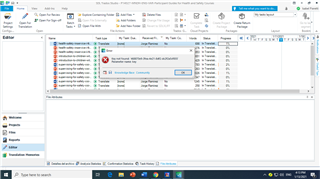
Trados Studio error message 'An error has occurred whilst trying to determine the file version' with a red cross icon, indicating a problem opening a file.

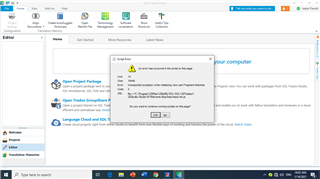
If I try to open a single file to translate it, I also get an error message.

PLEASE HELP!


Generated Image Alt-Text
[edited by: Trados AI at 12:34 AM (GMT 0) on 29 Feb 2024]
emoji
Parents
  • Thank you Steven Whale, but I cannot seem to do any of the solutions you offered.  When I tried to repair, I only get the option to uninstall.  The "modify" option is greyed out.  When I tried to rename the files Basesettings, Plugincache, etc. I could not find them.  I still have to try and view hidden folders.  There is an option when I right-click on Trados SDL icon that says reset, do you think I should try that one?  Please note that I uninstalled and reinstalled the program from my computer twice yesterday.  I was guessing that if I unistalled the program, run reset and reinstall I would get rid of the error, but to no avail.  I am losing jobs with this issue and I'm desperate.

    Thank you for your answer!

  • Hello ,

    First, please make sure you are logged onto the machine as ADMIN. 

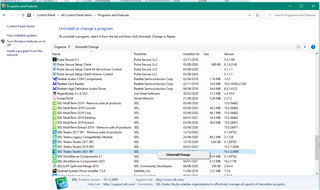
    When running a repair via the Control Panel - chose the following 

    Control Panel's 'Uninstall or change a program' window with Trados Studio highlighted and the 'UninstallChange' option visible.

    When you click Uninstall/Change, you will then be given the option to Repair-

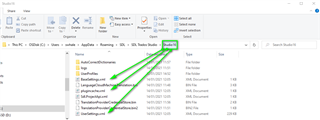
    When renaming the files- you will find them here-

    File Explorer window showing the navigation path to the AppData folder with 'Hidden Items' enabled, highlighting the Studio 16 folder.

    If you can't find the AppData folder then in File Explorer/VIEW- Enable 'Hidden Items' and then you should be able to navigate to The Studio 16 folder and the relevant files.

    Oana Nagy | QA Engineer | RWS Group

    emoji


    Generated Image Alt-Text
    [edited by: Trados AI at 12:34 AM (GMT 0) on 29 Feb 2024]
Reply Children