Error "Service 'Sdl.TranslationStudio.AlignmentEditor.IAlignmentEditorService' could not be started."

Dear Team,

I've installed the Subtitling app and the respective file type plugins as described here:

https://community.sdl.com/product-groups/translationproductivity/w/customer-experience/4680/studio-subtitling

and when starting SDL again the above error message appeared.

I've tried to follow those instructions:

https://gateway.rws.com/csm?id=kb_article_view&sysparm_article=KB0032269

I've found the "Studio 16"-folder (as below) and changed the "PlugIn"-folder to "Plugin", and ran the SDL Trados Studio repair, but that didn't work.

File Explorer window showing the directory path: C drive, Program Files (x86), SDL, SDL Trados Studio, Studio16.

Then I tried to rename those files, but didn't find them:
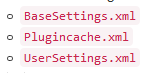
Close-up of three XML files named BaseSettings.xml, Plugincache.xml, and UserSettings.xml.

Could you please let me know how to proceed?

Many thanks in advance and best wishes,

Janina


Generated Image Alt-Text
[edited by: Trados AI at 12:33 AM (GMT 0) on 29 Feb 2024]
emoji
Parents
  • Hello ,

    It would be useful if you could provide the exact Studio version you are running (Help/About Studio) and the plugin version numbers so that we can ntry to replicate this.

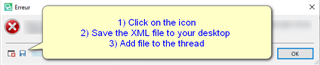
    Attaching the full error stack is also useful so that we can see exactly what maybe causing this issue.

    Error message popup in Trados Studio with instructions to click on the icon, save the XML file to desktop, and add file to the thread.

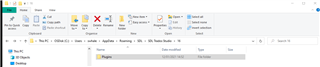
    When renaming the folder - for example

    Trados Studio file explorer window showing a folder named 'Plugins' selected.

    rename this to something like Plugin_old

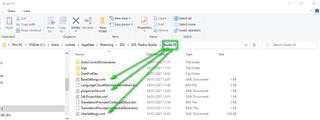
    When renaming the base settings/Plugincache and user settings .xml's you will find them here

    Trados Studio file path with arrows pointing to 'BaseSettings.xml' and 'UserSettings.xml' files for renaming.

    Also, when renaming the .xml's - just add_old (e.g. usersettings_old.xml)

    Please let us know if this now works for you.

    Oana Nagy | QA Engineer | RWS Group

    emoji


    Generated Image Alt-Text
    [edited by: Trados AI at 12:33 AM (GMT 0) on 29 Feb 2024]
Reply
  • Hello ,

    It would be useful if you could provide the exact Studio version you are running (Help/About Studio) and the plugin version numbers so that we can ntry to replicate this.

    Attaching the full error stack is also useful so that we can see exactly what maybe causing this issue.

    Error message popup in Trados Studio with instructions to click on the icon, save the XML file to desktop, and add file to the thread.

    When renaming the folder - for example

    Trados Studio file explorer window showing a folder named 'Plugins' selected.

    rename this to something like Plugin_old

    When renaming the base settings/Plugincache and user settings .xml's you will find them here

    Trados Studio file path with arrows pointing to 'BaseSettings.xml' and 'UserSettings.xml' files for renaming.

    Also, when renaming the .xml's - just add_old (e.g. usersettings_old.xml)

    Please let us know if this now works for you.

    Oana Nagy | QA Engineer | RWS Group

    emoji


    Generated Image Alt-Text
    [edited by: Trados AI at 12:33 AM (GMT 0) on 29 Feb 2024]
Children
No Data