SDL Studio crashes very often + problems with Plugins

Hello,

I am afraid SDL Studio 2021 SR1 latest release crashes a lot!!! You can see that in the middle of working, it disappears from the screen even without giving a warning or error message, and you have to restart it again! Sometimes it gives error messages. I really do not know what is going on!

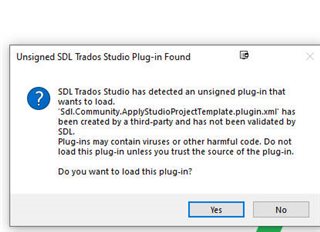
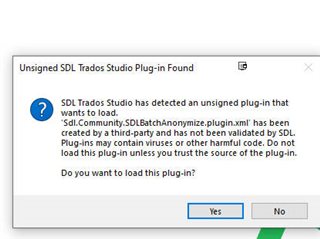
Also I updated two plugins today via the Notifications that came to me, and to my surprise I got the messages in the attached, so what is really going on? The notification app should not really cause this and this is not the first time that this happens by the way.

I am attaching the Log files.7457.logs.zipWarning message from SDL Trados Studio about an unsigned plug-in 'Sdl.Community.SDLBatchAnonymize.plugin.xml' created by a third party.Warning message from SDL Trados Studio about an unsigned plug-in 'Sdl.Community.ApplyStudioProjectTemplate.plugin.xml' created by a third party.
Certainly, you can see how many times it crashed!

I also added some aligned parts as TMX to a TM, but in many instances the translation is there, but it says No Search or Concordance Performed, and nothing comes even though those segments can be 99% match, and by concording you can see they are in the TM! I did everything by the book! No Open Tms opened in the translation memory Tab! The Look up options is checked in the Settings of the editor in the Automation section and I readded the TM once again to the project after removing it and restarting SDL Studio! I even created a new project!! Very very frustrating and time-consuming indeed.

Any ideas to why this is happening?

Sameh Ragab


Generated Image Alt-Text
[edited by: Trados AI at 12:38 AM (GMT 0) on 29 Feb 2024]
emoji
Parents
  • You still didn't respond to the questions the last time you raised this.  You really need to remove all your plugins and put them back only by using the appstore integration and not through having saved the plugins somewhere on your hard drive.

    I suggest you start with the two above and see whether they load correctly if you do this.  There isn't a simple answer to this Sameh... you have more plugins installed for daily use than anyone I have ever seen and I'm not confident they are all the ones that are supported for the version of Studio you are running.  I could be wrong... but if you don't go through this exercise we'll never know.

    Paul Filkin | RWS

    Design your own training!
    You've done the courses and still need to go a little further, or still not clear? 
    Tell us what you need in our Community Solutions Hub

  • Hi Paul,
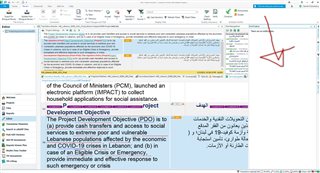
    I did uninstall all Plugins and went to the AppStore and downloaded the most recent ones an installed them, and Studio was working Ok till again it started crashing! It has nothing to do with the Plugins this, except for the messages I just received when I updated two of them via the Notification window! What good is this app then if it prompts you to upgrade the plugins then they give you  errors? Screenshot of Trados Studio software showing an open project with a red error message window indicating a plugin update issue.

    I also attached the Log files, and those certainly make everything clear to what is exactly going on. I am not complaining of a special plugin but because of the Unsigned Plugin messages when Studio starts. I also complain of the unjustified crashes, that happen when I am translating without doing any thing extra other than concording or working in the editor, so that is very very strange issue indeed.

    emoji


    Generated Image Alt-Text
    [edited by: Trados AI at 12:38 AM (GMT 0) on 29 Feb 2024]
Reply
  • Hi Paul,
    I did uninstall all Plugins and went to the AppStore and downloaded the most recent ones an installed them, and Studio was working Ok till again it started crashing! It has nothing to do with the Plugins this, except for the messages I just received when I updated two of them via the Notification window! What good is this app then if it prompts you to upgrade the plugins then they give you  errors? Screenshot of Trados Studio software showing an open project with a red error message window indicating a plugin update issue.

    I also attached the Log files, and those certainly make everything clear to what is exactly going on. I am not complaining of a special plugin but because of the Unsigned Plugin messages when Studio starts. I also complain of the unjustified crashes, that happen when I am translating without doing any thing extra other than concording or working in the editor, so that is very very strange issue indeed.

    emoji


    Generated Image Alt-Text
    [edited by: Trados AI at 12:38 AM (GMT 0) on 29 Feb 2024]
Children
No Data