TM not updating

Hello,

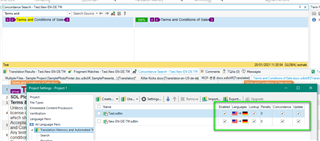
I am currently working on a file and using 2 TMs on Studio 2021 and when I update the translation of a segment it only updates on 1 TM. I have checked "overwrite existing translation units" but I still get 2 results for the same segment. One TM updates with the correct and current translation and the other one still suggests the old translation and I can't get the translation I confirm in the editor to propagate to all TMs.

Any idea?

Thank you for your help.

Elisa

Parents Reply
  • Hello @

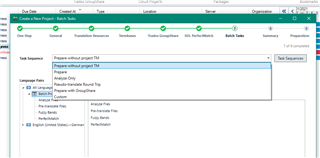
    It would be helpful to see a screenshot of the actual Language Pair/Translation memory settings (as I posted above) and to know if you prepared using a Project TM or not-

    Trados Studio screenshot showing Language PairTranslation memory settings with 'Prepare without project TM' selected.

    and to ensure that you have both TM's at the same level (as opposed to one perhaps in the specific language pair rather than both in All Language pair level).

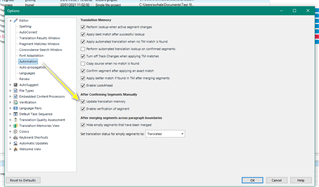
    Next I would perhaps look at (File Options Editor Automation) and check Update Translation Memory is enabled

    Trados Studio Options menu with 'Editor' selected, showing 'Automation' settings and 'Update Translation Memory' enabled.

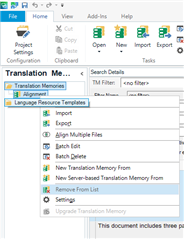
    Its also worth checking that the TM is NOT open in the TM Window-

    Trados Studio Translation Memories tab with options to import, create, or remove a Translation Memory.

    If it is- close the project and then remove the TM from Translation Memory and then reopen the project.

    Should the problem persist, then I would suggest exporting the TM to TMX and then reimport to a newly created TM

    Oana Nagy | QA Engineer | RWS Group

    emoji


    Generated Image Alt-Text
    [edited by: Trados AI at 12:40 AM (GMT 0) on 29 Feb 2024]
Children