 Translate



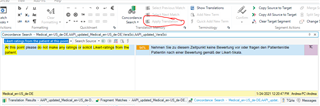
TM units are only shown under concordance search so the "apply translation" feature is greyed out. TM is enabled. What am I doing wrong? Studio 2017
Generated Image Alt-Text
[edited by: Trados AI at 12:44 AM (GMT 0) on 29 Feb 2024]


TM units are only shown under concordance search so the "apply translation" feature is greyed out. TM is enabled. What am I doing wrong? Studio 2017
Hello Andrea Gronwald
When you switch to the Translation Results window are you able to see the translations from your TM?
I have tried to replicate what might be the issue in 2017 but have been unable to do so.
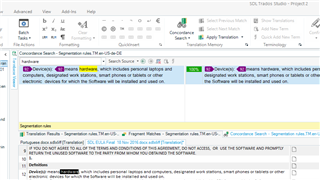
Please try resetting Windows Layout and see if this helps.
Oana Nagy | QA Engineer | RWS Group

Hi ,
I think Andrea meant Search (not Concordance).
If I select a non 100% match segment, and then type something to search the TM, I can repro it in Trados Studio 2019.

Hi Steven, thank you so much for your efforts! my window looks exactly like yours, but the "Apply Translation" is greyed out. I can only insert the match into the translation if I highlight the result and then choose "insert into translation."
I noticed that matches within the document show correctly and the translation can be applied. But when the translation is found in the TM from previous translations that I have done, then "apply translation" is greyed out.
Hello Jesús, sorry if I was not clear. Steven understood it correctly. I am actually not searching anything. I am translating the document. Matches seem to be shown automatically through concordance. If I turn off the automatic concordance search, the TM units are not shown even though they exist. Results shown through concordance cannot be applied but only be copied and pasted.
