
 Translate



Hello,
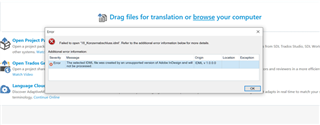
I use Studio 2017 and am having difficulties with IDML files (InDesign). I've worked with this file type a lot in the past, but judging from other forum posts, I suspect my client has upgraded to InDesign 2019. I saw the suggestions to click certain settings when setting up a new project. But what about if I just want to translate a single document? Where do I find the file format settings before dragging the IDML file?
Thanks for any advice!
Generated Image Alt-Text
[edited by: Trados AI at 12:46 AM (GMT 0) on 29 Feb 2024]


