Re-occurance of "Dependency file not found"

Hello,

I am using SDL Trados Freelance 2021 for a translation task on PPT format (I have the original pptx file). A window popped out, indicating that the Dependency file is not found.

After some research on the SDL Community, I followed the steps: clicking Yes to locate the original file. It worked well, and I was able to continue working on the task. I know that I can click No and keep working on it, but since I need to "Finalize" or "Generate Target Translation" once I finish, I want to solve this problem.

However, the next time I open the same project on Trados, the same "Dependency file is not found" re-occured. 

This time I followed the steps: File-->Advanced save--->Save source as. I save this task in another file, because I afraid that it would replace the original file.

Once I closed and reopened Trados and the project again: Dependency file is not found is still there.

What sould I do to avoid the re-occurance of the problem? 

Thank you!

Sz-Wei


Parents
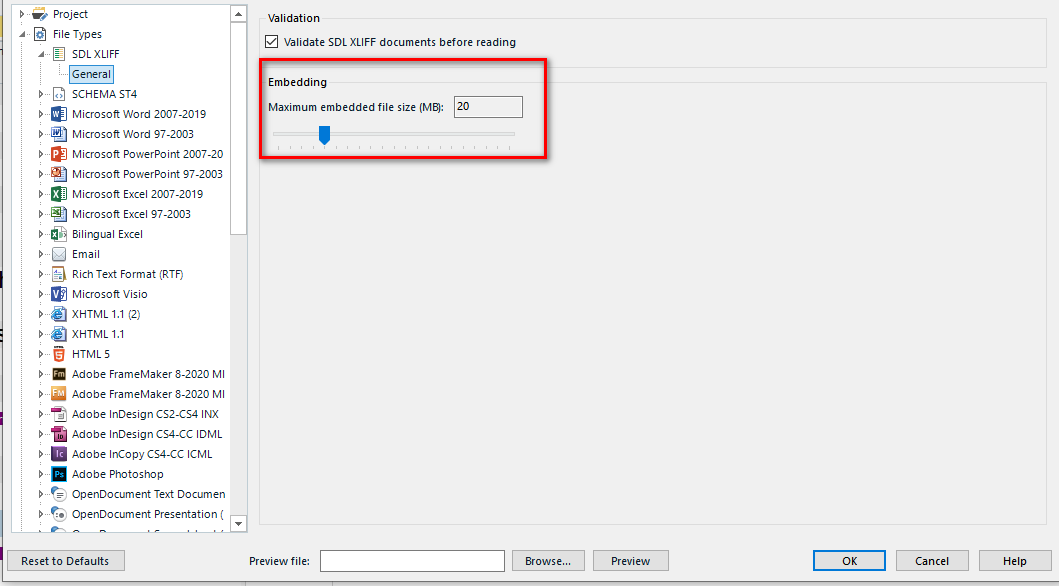
  • The PowerPoint file you are translating most probably exceeds the default size for embedding in SDLXLIF.

    Go to Project Settings (and ONLY there, NOT to Options), chose File types, click SDLXLIFF, chose general and set the size of an embedded file to maximum:

    Trados Studio Project Settings window showing File Types list with SDLXLIFF selected. Under General settings, the Embedding section with Maximum embedded file size (MB) set to 20 highlighted.

    Please also make sure, that no anti-virus or other software is emptying your Windows temp folder.

    _________________________________________________________

    When asking for help here, please be as accurate as possible. Please always remember to give the exact version of product used and all possible error messages received. The better you describe your problem, the better help you will get.

    Want to learn more about Trados Studio? Visit the Community Hub. Have a good idea to make Trados Studio better? Publish it here.

    emoji


    Generated Image Alt-Text
    [edited by: Trados AI at 12:49 AM (GMT 0) on 29 Feb 2024]
Reply
  • The PowerPoint file you are translating most probably exceeds the default size for embedding in SDLXLIF.

    Go to Project Settings (and ONLY there, NOT to Options), chose File types, click SDLXLIFF, chose general and set the size of an embedded file to maximum:

    Trados Studio Project Settings window showing File Types list with SDLXLIFF selected. Under General settings, the Embedding section with Maximum embedded file size (MB) set to 20 highlighted.

    Please also make sure, that no anti-virus or other software is emptying your Windows temp folder.

    _________________________________________________________

    When asking for help here, please be as accurate as possible. Please always remember to give the exact version of product used and all possible error messages received. The better you describe your problem, the better help you will get.

    Want to learn more about Trados Studio? Visit the Community Hub. Have a good idea to make Trados Studio better? Publish it here.

    emoji


    Generated Image Alt-Text
    [edited by: Trados AI at 12:49 AM (GMT 0) on 29 Feb 2024]
Children