 Translate



I receive an error message saying that there are no valid files for the retrofit just after clicking on the option. That is, no window is displayed at all where I can choose the reviewed file.

RWS Community
I receive an error message saying that there are no valid files for the retrofit just after clicking on the option. That is, no window is displayed at all where I can choose the reviewed file.
Hello @María García Díaz
Could you explain exactly what you are doing when this error appears?
Are you trying to import files that were exported for bilingual review?
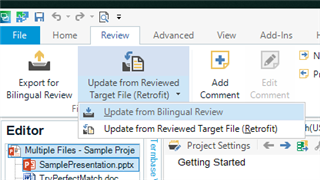
What exactly happens when you select Update from Reviewed target File or Update from Bilingual Review?
Oana Nagy | QA Engineer | RWS Group


Hi, Steven
Thanks for your reply.
I just solved the problem. The .sdlxliff file had comments, and that was the reason for the error.
I exported the file for bilingual review (two days ago) and now I was trying to update the project memory using Update from reviewed file, as the client sent me back the final version.
Thanks again,
Hi, Steven
Thanks for your reply.
I just solved the problem. The .sdlxliff file had comments, and that was the reason for the error.
I exported the file for bilingual review (two days ago) and now I was trying to update the project memory using Update from reviewed file, as the client sent me back the final version.
Thanks again,
