"Update Main Translation Memories" no longer working after I installed the latest update of Studio 2019

I recently installed the latest update of Trados Studio 2019. Since then, whenever I've completed a job and try to run the "Finalize" functionality, the program throws the an error message ("TranslationProviderThrewException") when trying to run the "Update Main Translation Memories" part.

Restarting Trados Studio or rebooting my computer doesn't fix the problem.

I've tried to work around the problem by importing the translated sdlxliff file into each of the TMs I want to update. But when doing so, I get the error message: "Import failed. The file could not be processed. The translation memory or TM container appears to be missing and may have been deleted."

I have not deleted, moved or renamed any TMs, folders or anything. Everything is exactly where it used to be, and I am working the way I have always worked. The only thing that has changed is the fact that I've updated Trados Studio.

Can anyone help?

Thanks a lot in advance :)

  • Hello ,

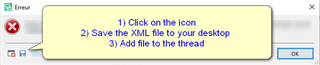
    Could you please post the full error stack as this provides useful information -

    Error message popup in Trados Studio with instructions: 1) Click on the icon, 2) Save the XML file to your desktop, 3) Add file to the thread.

    Also, could you tell us please where you have saved the TM's? 

    If these are on the cloud, the update may have disabled the connection to the external drive/shared resource or file sharing application such as OneDrive/DropBox


    Oana Nagy | Developer Experience | QA Engineer | RWS Group

    emoji


    Generated Image Alt-Text
    [edited by: Trados AI at 12:58 AM (GMT 0) on 29 Feb 2024]
  • Hello Steven,

    Thank you for your reply!

    I've attached the file as requested. This file is from the error I receive when trying to import an sdlxliff file into a TM. (The error message I receive when trying to run the Batch Tasks -> Update Main Translation Memories option does not have a Save icon next to it.)

    My TMs are all saved on my computer.

    <SDLErrorDetails time="04-02-2021 14:22:38">
      <ErrorMessage>Import failed. The file could not be processed.</ErrorMessage>
      <Exception>
        <Type>System.Exception, mscorlib, Version=4.0.0.0, Culture=neutral, PublicKeyToken=b77a5c561934e089</Type>
        <HelpLink />
        <Source>Sdl.TranslationStudio.TranslationMemoryManager</Source>
        <HResult>-2146233088</HResult>
        <StackTrace><![CDATA[   ved Sdl.TranslationStudio.TranslationMemoryManager.ImportWizard.ImportJobRequest.Execute(IJobExecutionContext context)
       ved Sdl.Desktop.Platform.Implementation.Services.Job.<_worker_DoWork>b__47_0()
       ved Sdl.Desktop.Logger.Log.Resources(Object message, Action action)
       ved Sdl.Desktop.Platform.Implementation.Services.Job._worker_DoWork(Object sender, DoWorkEventArgs e)
       ved System.ComponentModel.BackgroundWorker.OnDoWork(DoWorkEventArgs e)
       ved System.ComponentModel.BackgroundWorker.WorkerThreadStart(Object argument)]]></StackTrace>
        <InnerException>
          <Type>Sdl.LanguagePlatform.Core.LanguagePlatformException, Sdl.LanguagePlatform.Core, Version=1.6.0.0, Culture=neutral, PublicKeyToken=c28cdb26c445c888</Type>
          <HelpLink />
          <Source>Sdl.LanguagePlatform.TranslationMemoryApi</Source>
          <HResult>-2146233088</HResult>
          <StackTrace><![CDATA[   ved Sdl.LanguagePlatform.TranslationMemoryApi.FileBasedTranslationMemoryLanguageDirection.AddTranslationUnitsMasked(TranslationUnit[] translationUnits, ImportSettings settings, Boolean[] mask)
       ved Sdl.LanguagePlatform.TranslationMemoryApi.TranslationMemoryLanguageDirectionImportExport.AddTranslationUnitsMask(TranslationUnit[] tus, ImportSettings settings, Boolean[] mask)
       ved Sdl.Core.TM.ImportExport.Importer.ProcessBufferedTUs(ImportStatistics stats, ImportResultsMap map)
       ved Sdl.Core.TM.ImportExport.Importer.Flush(ImportStatistics stats, ImportResultsMap map)
       ved Sdl.Core.TM.ImportExport.BilingualContentImporter.FileComplete()
       ved Sdl.FileTypeSupport.Framework.Core.Utilities.BilingualApi.BilingualContentHandlerAdapter.FileComplete()
       ved Sdl.FileTypeSupport.Framework.Integration.AbstractBilingualProcessorContainer.FileComplete()
       ved Sdl.FileTypeSupport.Framework.Integration.MultiFileConverter.FileComplete()
       ved Sdl.FileTypeSupport.Framework.BilingualApi.AbstractBilingualContentProcessor.FileComplete()
       ved Sdl.FileTypeSupport.Framework.Integration.AbstractBilingualProcessorContainer.FileComplete()
       ved Sdl.FileTypeSupport.Bilingual.SdlXliff.XliffFileReader.OnEndFile()
       ved Sdl.FileTypeSupport.Bilingual.SdlXliff.SdlXliffFeeder.<>c.<HandleFile>b__15_1(ISdlXliffStreamContentHandler handler)
       ved System.Collections.Generic.List`1.ForEach(Action`1 action)
       ved Sdl.FileTypeSupport.Bilingual.SdlXliff.SdlXliffFeeder.HandleFile()
       ved Sdl.FileTypeSupport.Bilingual.SdlXliff.SdlXliffFeeder.ContinueScanning()
       ved Sdl.FileTypeSupport.Bilingual.SdlXliff.XliffFileReader.ContinueParsing()
       ved Sdl.FileTypeSupport.Bilingual.SdlXliff.XliffFileReader.ParseNext()
       ved Sdl.FileTypeSupport.Framework.Integration.FileExtractor.ParseNext()
       ved Sdl.FileTypeSupport.Framework.Integration.MultiFileConverter.ParseNext()
       ved Sdl.FileTypeSupport.Framework.Integration.MultiFileConverter.Parse()
       ved Sdl.Core.TM.ImportExport.Importer.ImportBilingualFile(String fileName)
       ved Sdl.Core.TM.ImportExport.Importer.Import(String fileName, IImportDestination importDestination)
       ved Sdl.LanguagePlatform.TranslationMemoryApi.TranslationMemoryImporter.Import(String fileName)
       ved Sdl.TranslationStudio.TranslationMemoryManager.ImportWizard.ImportJobRequest.Execute(IJobExecutionContext context)]]></StackTrace>
        </InnerException>
      </Exception>
      <Environment>
        <ProductName>SDL Trados Studio</ProductName>
        <ProductVersion>15.0.0.0</ProductVersion>
        <EntryAssemblyFileVersion>15.2.8.3007</EntryAssemblyFileVersion>
        <OperatingSystem>Microsoft Windows 10 Home</OperatingSystem>
        <ServicePack>NULL</ServicePack>
        <OperatingSystemLanguage>1030</OperatingSystemLanguage>
        <CodePage>1252</CodePage>
        <LoggedOnUser>MERETEHVAS\meret</LoggedOnUser>
        <DotNetFrameWork>4.0.30319.42000</DotNetFrameWork>
        <ComputerName>MERETEHVAS</ComputerName>
        <ConnectedToNetwork>True</ConnectedToNetwork>
        <PhysicalMemory>33492768 MB</PhysicalMemory>
      </Environment>
    </SDLErrorDetails>

  • Support Case Id : 00579965. I am unable to replicate this. As this appears to have happened after the update a Support case has been logged for your assistance. Please check your SDL Community email address for updates.


    Oana Nagy | Developer Experience | QA Engineer | RWS Group

  • Translation memories were originally created using older versions of Trados Studio (some in Studio 2011). Upgrading these (https://gateway.rws.com/csm?id=kb_article_view&sysparm_article=KB0034935) solved the problems.