
 Translate



Hi! I've been a professional linguist for five years now, but am just now trying out Trados.
For this project, I have a huge bilingual Excel document with multiple columns and a total of 1986 rows. Sample:
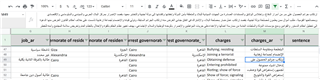
Since importing the entire file came out wonky in Trados, I tried just copying in one Arabic column at a time. When I do, however, Trados sometimes splits the longer cells: when importing column M, I ended up with 2300+ segments instead of just 1986.
I tried importing a column that had less text in turn, but that column has several blank cells that Trados didn't take. So I ended up with ~700 segments instead of 1986.
I'm a newbie, but I'm willing to try any fix you guys suggest. These texts are super repetitive and I could easily save five weeks' worth of work by using Trados for them. Thanks!
Product version: 16.1.3.4096
Generated Image Alt-Text
[edited by: Trados AI at 1:01 AM (GMT 0) on 29 Feb 2024]


